
Black Friday · 30% off · Starts November 23
Add subtitles to every video in minutes, not hours
SubtitleBee auto-generates subtitles for your videos, so creators, marketers and businesses can edit, style and export them for TikTok, Reels, YouTube and courses.
30% OFF this Black Friday
Monthly: first 3 months · Annual: first year
Nov 23 to Dec 2 · New signups only
Starts November 23. Your discount code is revealed here that day.
Before and after
You are in good company


What You Get With SubtitleBee
Save Hours
Auto subtitles you just review and edit, instead of typing every line.
Reach More Viewers
Translate your subtitles into 100+ languages.
Look On-Brand
Your fonts and colors with no watermark on paid plans, plus your logo on Premium and Business.
How It Works in 3 Steps
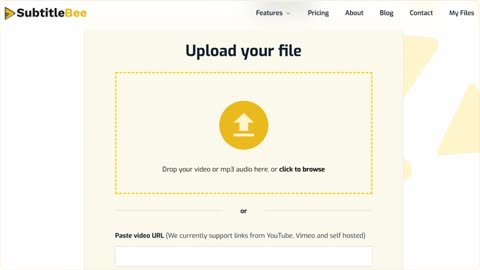
Upload
Upload an MP4, MOV, WMV, AVI or WebM file, or paste a video link. Pick the spoken language from 60+ languages.
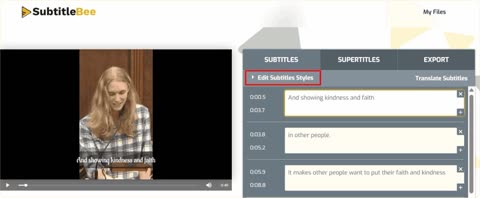
Auto-Subtitle and Edit
SubtitleBee writes and syncs the subtitles. Fix any word, then style the font, color, size and position.
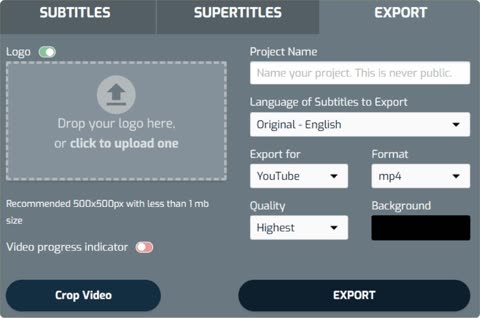
Export or Translate
Export the video with burned-in subtitles as MP4, AVI or MOV, download the subtitle file, or translate into 100+ languages.


Your Black Friday Price From November 23
30% OFF this Black Friday
Monthly: first 3 months · Annual: first year
Nov 23 to Dec 2 · New signups only
Starter
For individuals who caption content and export watermark-free videos
Regular price$19$13.30/month
for your first 3 months
Then $19/month
You save $17.10 over 3 months
Available from November 23
- 240 minutes of video per month
- Videos up to 20 minutes long
- 3 translations per video
- Watermark-free exports
- 12 video exports per month
- Basic support
Most Popular
Premium
For content creators who add subtitles and overlay captions
Regular price$49$34.30/month
for your first 3 months
Then $49/month
You save $44.10 over 3 months
Available from November 23
- 1,050 minutes of video per month
- Videos up to 30 minutes long
- 10 translations per video
- Watermark-free exports
- 30 font styles
- Priority support
Business
For businesses that caption and transcribe content at scale
Regular price$129$90.30/month
for your first 3 months
Then $129/month
You save $116.10 over 3 months
Available from November 23
- 3,600 minutes of video per month
- Videos up to 60 minutes long
- 15 translations per video
- Watermark-free exports
- Full brand kit
- Premium support
Need more? Contact us for a custom plan.
Prices are in USD. VAT or sales tax may be added at checkout.
Questions About the Offer
Who can get the Black Friday discount?
The discount is for new SubtitleBee accounts created to buy a plan during the offer, from November 23 to December 2, 2026 (until 23:59 CET, Madrid time). Existing accounts, including free and trial accounts, aren't eligible, and opening another account doesn't make an existing user eligible.
How does the discount work on monthly plans?
Your first 3 monthly payments are 30% off. From the 4th month, your plan renews at the regular monthly price: Starter $19, Premium $49, Business $129.
How does the discount work on annual plans?
Your first annual payment is 30% off. After 12 months, your plan renews at the regular annual price: Starter $199, Premium $519, Business $1,359.
Can I cancel anytime?
Yes. There is no long-term contract. You can cancel your subscription at any time from your account page, and it stays active until the end of the period you paid for.
Which languages are supported?
SubtitleBee auto-generates subtitles in 60+ languages and translates them into 100+ languages.
Can I remove the watermark?
Yes. Videos you export on Starter, Premium and Business have no SubtitleBee watermark. The watermark only appears on the Free plan.
How long can my videos be, and how many minutes do I get?
Starter gives you 240 minutes a month and videos up to 20 minutes long. Premium gives you 1,050 minutes a month and videos up to 30 minutes. Business gives you 3,600 minutes a month and videos up to 60 minutes.
How do I pay? Is VAT included?
Payment is handled by Paddle, our checkout provider. Prices are in USD. VAT or sales tax may be added at checkout, depending on your country.
What happens to my videos after the discount ends?
Nothing changes for your videos. Your plan renews at the regular price and your videos stay in your account, with the same plan limits.
Add Subtitles to Every Video in Minutes, Not Hours
30% OFF this Black Friday
Monthly: first 3 months · Annual: first year
Nov 23 to Dec 2 · New signups only