


video tutorials for social media
How to translate English to Korean video subtitles?
What I have observed as a content writer for more than 2 years is that the best and greatest contents reach the intended audiences effortlessly. Content creators opt for new and different techniques to create such content. One of the ways is to use English subtitles with their content.
But not every viewer needs subtitles in the English language. A video in English may not connect with all Korean language speakers, for example, unless obviously you add Korean subtitles to the video.
Over 80 million people speak the Korean language. Adding Korean subtitles to your video will increase the chances of its accessibility and your audience retention. Let’s see why and how to translate English to Korean video subtitles. We will also understand why reviewing subtitles is important.

Why translate English to Korean video subtitles?
South Koreans have a strong love of tech and they actively watch online video content on YouTube. They have a community oriented culture, but in 2023, the usage of social media went up to 92%. They are also good readers because in 2024, approximately 10,262 book titles were translated into the Korean language.
Because of Korean’s excessive online video watching habits, K-dramas and K-pop made huge success worldwide. Many call it the Korean Wave.
Considering such high consumption of content by Koreans, translating English video subtitles into Korean subtitles is clearly a great idea for reaching Korean viewers’ social media feeds and reels.
How to translate English to Korean video subtitles
Use a subtitle generator like SubtitleBee to translate English to Korean video subtitles. Its AI video translator will give you the audio transcription of your content in the Korean language in just a few minutes. Once the English audio is transcribed to Korean, SubtitleBee allows you to review and edit Korean subtitles easily.
Here is what you can do simply to translate English subtitles of your video to Korean subtitles using SubtitleBee. The steps are few and easy.
1. Create an account
Open SubtitleBee and sign up with your email for free. It works in the browser, and therefore, no downloads are required. You can use the free trial to try out SubtitleBee and its features.
2. Log in to your account
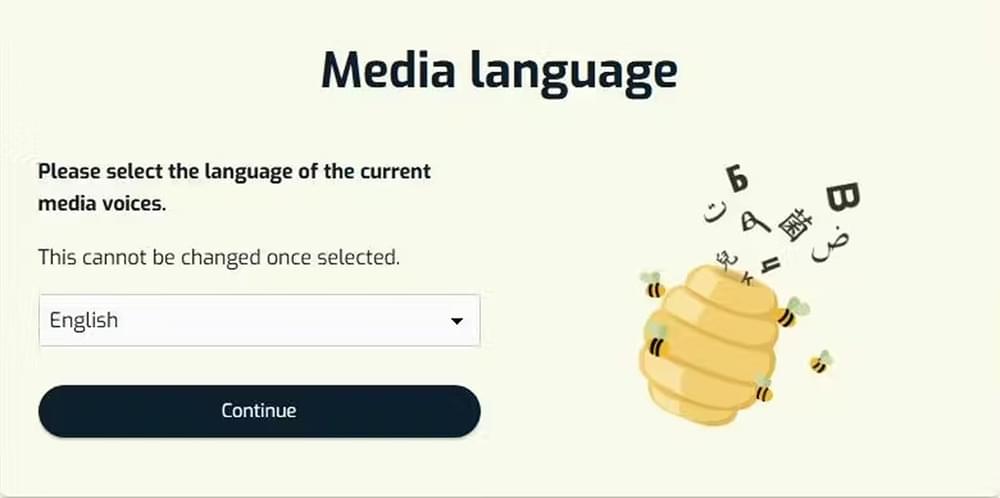
Log in and choose “Upload new file”. You will be taken to the Media Language page. Choose English since it is the actual language that is spoken.
3. Upload video
Upload the file from your computer or paste the URL of Vimeo, YouTube, or any other personal platform. SubtitleBee supports all major video formats, including MP4, MOV, AVI, and MKV.
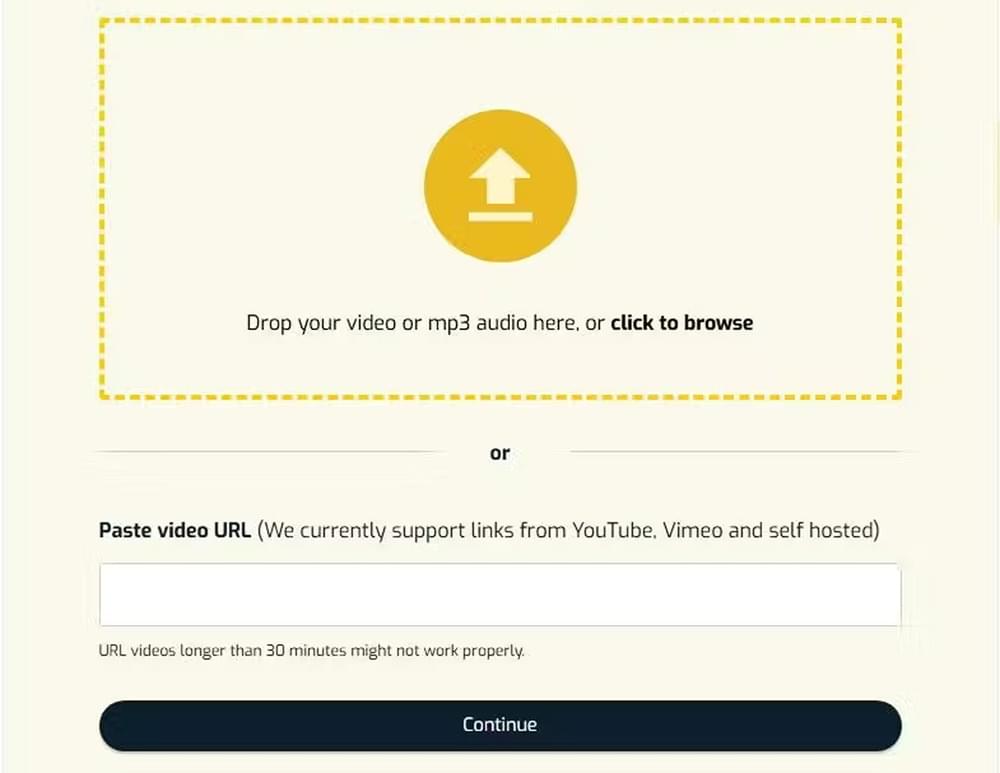
SubtitleBee’s AI will automatically detect the English audio and will generate English subtitles.
4. Edit English subtitles
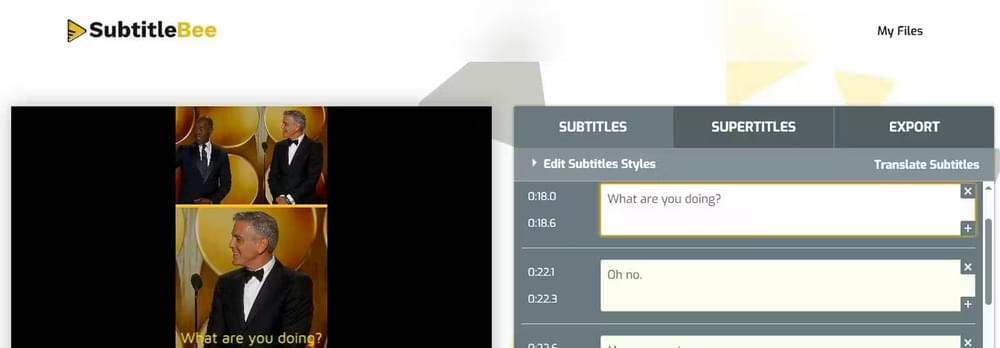
When the transcription process is complete, you will be taken to the SubtitleBee dashboard, where you will see the automatically synced English subtitles for your video.
Before you move on to add Korean subtitles to your video, review for AI errors. A good reviewing will let the Korean translation stay with the real meaning and purpose of the actual content.
5. Translate to Korean subtitles
Once you are happy with the edited transcription, it’s time to translate to Korean subtitles.
Click the “Translate Subtitles” at the right corner and select “Korean” from the ‘new subtitle language’ dropdown. Click the “Add Subtitles” button at the bottom.
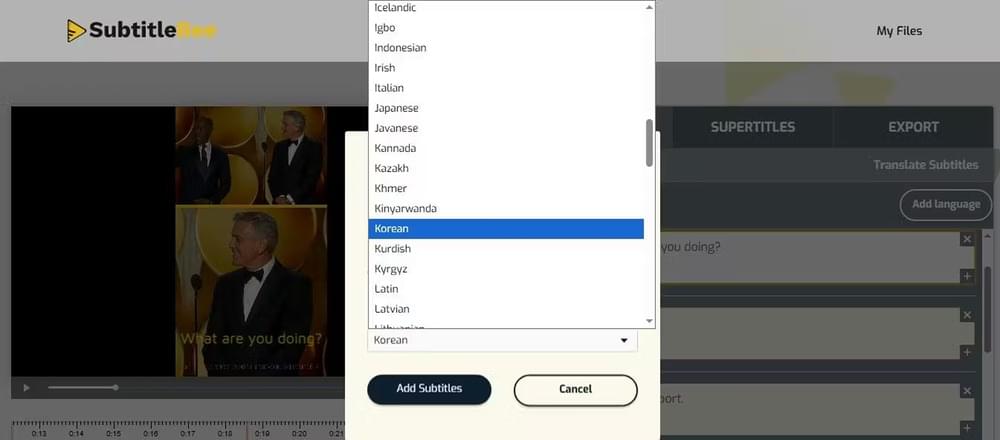
In the SubtitleBee dashboard, you have subtitles in two different languages: English subtitles and Korean subtitles. Review the Korean subtitles for any misspellings.
You can also use “Edit Subtitle Styles” if you prefer to change the color or style of the subtitles’ font.
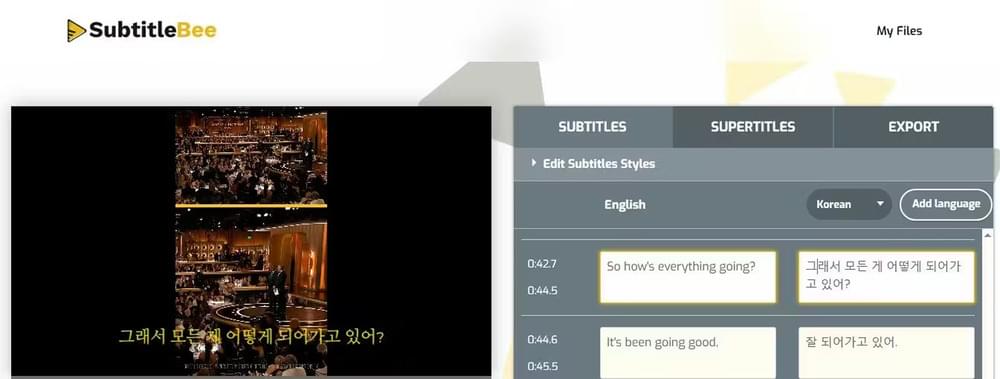
6. Export video with Korean subtitles
Once done, go to the Export option and name the video. Select Korean as the subtitle language before exporting your video. Use other features available as needed.
Press the “Export” button when you are done.
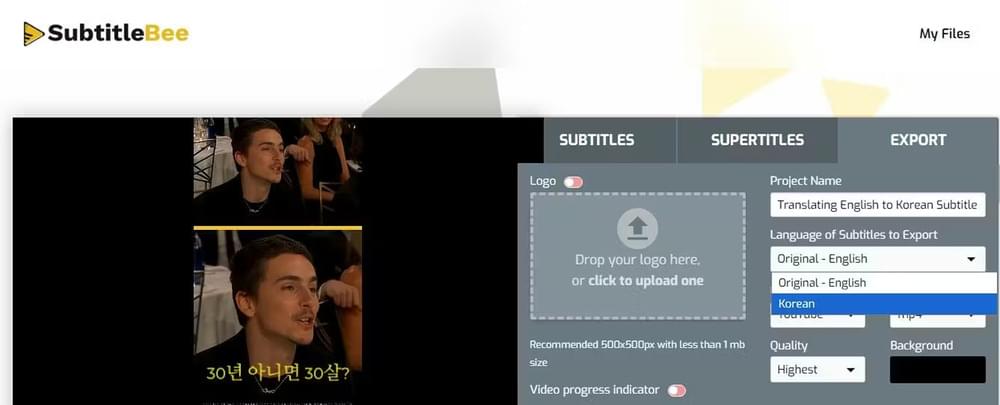
This was all you needed to do to successfully translate English to Korean subtitles for your video.
You can download your video with burned-in Korean subtitles or export the subtitle file in formats, e.g., SRT, VTT, ASS, or TXT.
Why is reviewing the English to Korean video subtitles important?
Korean is not a difficult language by nature, but its language structure is very different from English. English follows a subject-verb-object order, whereas Korean sentences place the verb at the end, and emphasis is more on context. For example, in the English version of the sentence:
“I will explain this in the next video.”
The verb/action is placed earlier. The same sentence in Korean, and the verb comes at the end.
다음 영상에서 이 내용을 설명할게요
‘Next in the video let me explain the content’
Its sentence flow, verb placement, and use of politeness levels mean that subtitles often need adjustment rather than direct translation. To make these adjustments, you will also need to consider subtitle pacing. Korean subtitles will require different timing and line breaks in subtitle generating tools.
These are the two main reasons why direct translation alone is not always enough when you opt to translate English subtitles into Korean video subtitles. For the same reasons, reviewing translated subtitles is just as important as generating them.
What type of content should be translated into Korean?
If you are a content writer reading this article, I’m sure you already know people watch all sorts of content. Korean youth watch all types of quality digital content, including gaming content, fantasy, and romance drama.
Related: How to auto generate subtitles for movies
What’s different about Koreans is that they use YouTube extensively. It is said that Koreans use YouTube as the rest of the world uses Google 🙂 Koreans topped the world in 2024 in average YouTube watch time/month which was over 2,600 minutes per user or above 40 hours/month.
Considering these two analogies about Korean viewers, it doesn’t matter what content you are creating; if your content is going to go on YouTube, I recommend adding a Korean transcript of your video for good reach and video engagement.
Conclusion
Translating English videos into Korean subtitles doesn’t have to be difficult. Use the latest AI with SubtitleBee to make translations and transcriptions a piece of cake. With accurate subtitles, your content becomes accessible to a wider audience.
FAQs
How to add English subtitles on Korean drama videos?
There is zero denying that the popularity of Korean drama is impressive. Adding English to Korean drama videos is the only way to not miss out on anything if you are a non-Korean speaker like me. Here’s a simple method to add English subtitles to Korean drama videos.
- Upload your video to SubtitleBee.
- Review Korean subtitles.
- Translate these to English subtitles using the ‘translate subtitles’ option.
- Export the video with burned-in English subtitles or download the subtitle file.
Which subtitle file format should I export?
It depends on the platform on which you are opting to post your video. Most platforms prefer SRT file as the standard. VTT is good for web players, while burning subtitles into the video makes sure that they are visible for everyone.
Can I add multiple languages in SubtitleBee?
Yes, sure, SubtitleBee supports 120+ languages. All you need to do is just click “Add Language” and repeat the process as mentioned above in the article.
Read more:
How to translate English to Hindi



Add and translate your subtitles to more than 100 languages with high accuracy
Our solution
SubtitleBee
Make your video understandable by using SubtitleBee for free
Start now for freeTop Articles

Getting Started with AI-Powered SubtitleBee

3 Effective Ways To Add Subtitles To Video Online Without Watermark

VEED vs. Kapwing: Which Subtitle Generator wins?

Kapwing vs. SubtitleBee: Which subtitling tool should you choose?

5 Top Verbit Alternatives for Transcription