


video tutorials for social media
What are captions? Guide to video reach and accessibility
Have you ever scrolled through your feed in a quiet room, watched a full video without sound, and understood every single word? That is the power of captions. So, let’s understand what are captions in the world of content creation.
Captions were introduced in the 1970s for Deaf or hard of hearing TV viewers to help them watch Tele content with ease. Since then, captions have become mandatory for any television broadcast in the United States. Then came the internet and captions are still a necessity to this date for every post, audio and video. The rule is simple, if your video does not have a text track, you are not just losing the 20% of the world with hearing loss, you are losing the 80% of mobile users who browse on mute.
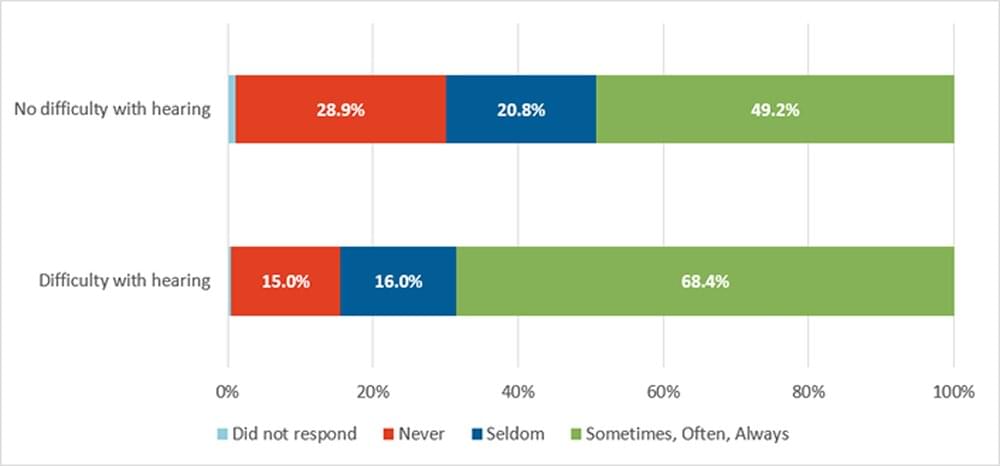
Source: Frequency of CC use
In this guide, we are breaking down exactly what captions are, why they differ from subtitles, and how the “hidden” tech behind them can skyrocket your content reach.
What are captions?
Captions are the transcription of speech and non-speech audio information in a video. They translate all the words and sound into text such as background sounds, speaker distinction and any other information that the audio would have communicated.
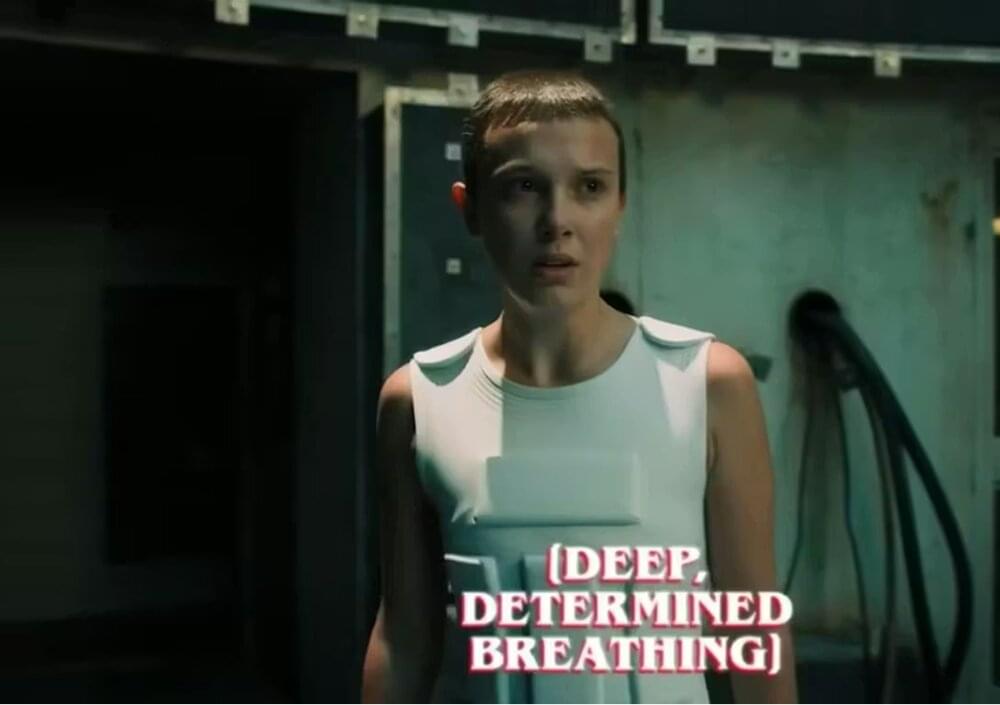
Captions were introduced to provide equity to viewers who are Deaf or hard of hearing. Started from screens of film and TV, adding captions to almost every video or audio content has become a norm.
Captions are a timed-text transcript of the audio in a video. Unlike a static blog post, captions are dynamic; they are synchronized to the video’s time-code.
What is a caption example?
In a professional caption file (like an SRT), an example entry looks like this:
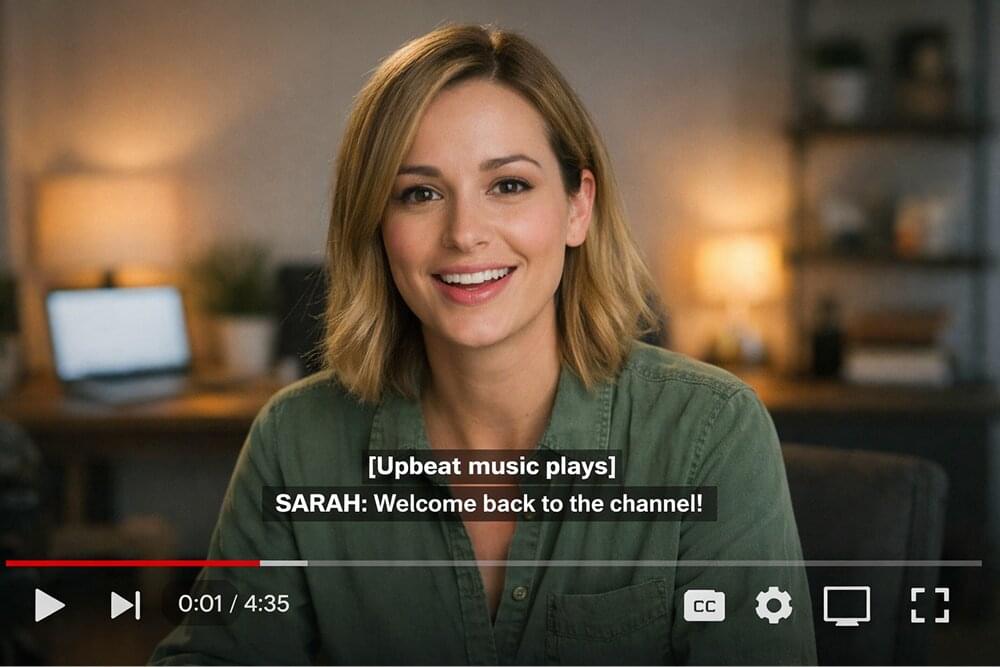
1 | 00:00:01,500 --> 00:00:04,000 |
In this example, the time-code tells the player exactly when to show the text, the bracketed text describes a non-speech sound, and the double chevron (>>) identifies the speaker. On the screen, you simply see these elements appear as the video plays.
What are types of captions? Which type of caption do you need?
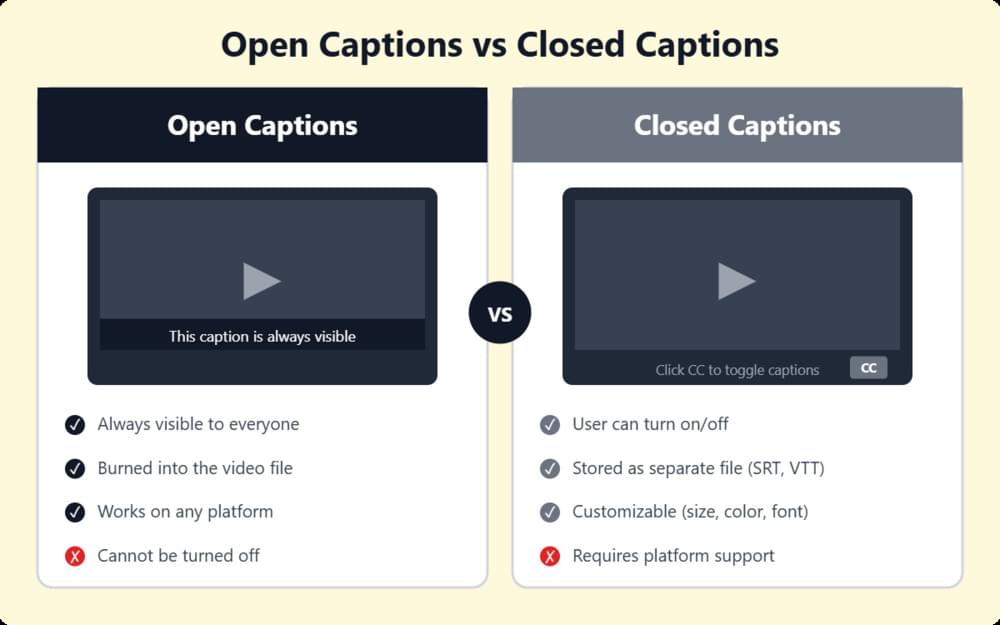
Not every video requires the same type of text overlay. Depending on your platform and your audience’s needs, you’ll likely use one of these three formats:
- Closed vs. Open Captions: This is the most frequent choice a creator makes.
- Closed Captions (CC): allow the user to toggle the text on or off (think YouTube’s “CC” button).
- Open Captions, however, are “burned” into the video frames during the editing process. They can not be turned off.
- SDH (Subtitles for the Deaf and Hard of Hearing): This is the gold standard for captioning inclusivity because it is combining the descriptive power of captions with the readability of subtitles.
- Forced Narratives: Have you ever watched a movie where a character suddenly speaks a foreign language and a translation appears automatically? That’s a Forced Narrative. It’s “forced” because it’s essential to the story.
What are captions for deaf people?
Captions for the deaf and hard-of-hearing referred to as SDH or Closed Captions, are specialized text tracks designed to provide “audio equity.” Captions for deaf people include:
- Speaker Changes: Identifying who is talking when they are off-camera.
- Atmospheric Sounds: Descriptions like [Door Creaks] or [Tense Orchestral Music].
- Tone Indicators: Notations like [Whispering] or [Sarcastic Tone] to convey emotion that would otherwise be missed.
Captions vs. Subtitles
Let’s clear up the most common point of confusion in the industry. Captions vs Subtitles. While people use these terms interchangeably, they serve different masters:
- Subtitles are for translation. They assume the viewer can hear the audio but does not understand the language. (e.g., watching a French film with English text)
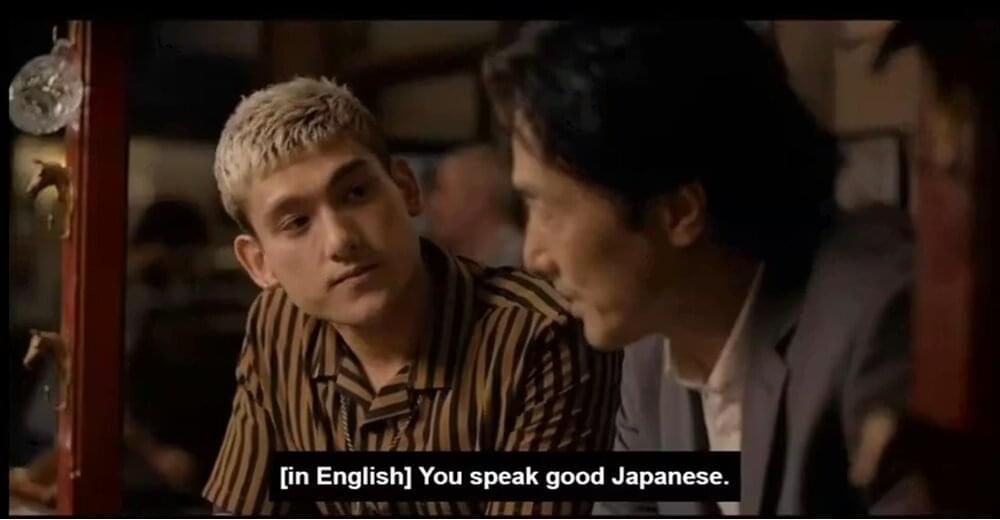
- Captions are for accessibility. They include not just dialogue, but also non-speech elements like [doorbell rings], [upbeat music plays], or [whispering].
Captions actually transcribe the audio file in text in a video project. These descriptions are written in the same language as the audio. Whereas, subtitles are a translated text of the dialogue for viewers who do not understand the language being spoken. Therefore, recognizing the difference between these two elements is important. To keep the screen from becoming cluttered, video creators may omit captions when subtitles already provide enough information.
Unlike simple subtitles, captions show sound effects, speaker identification, and music cues.
For example:
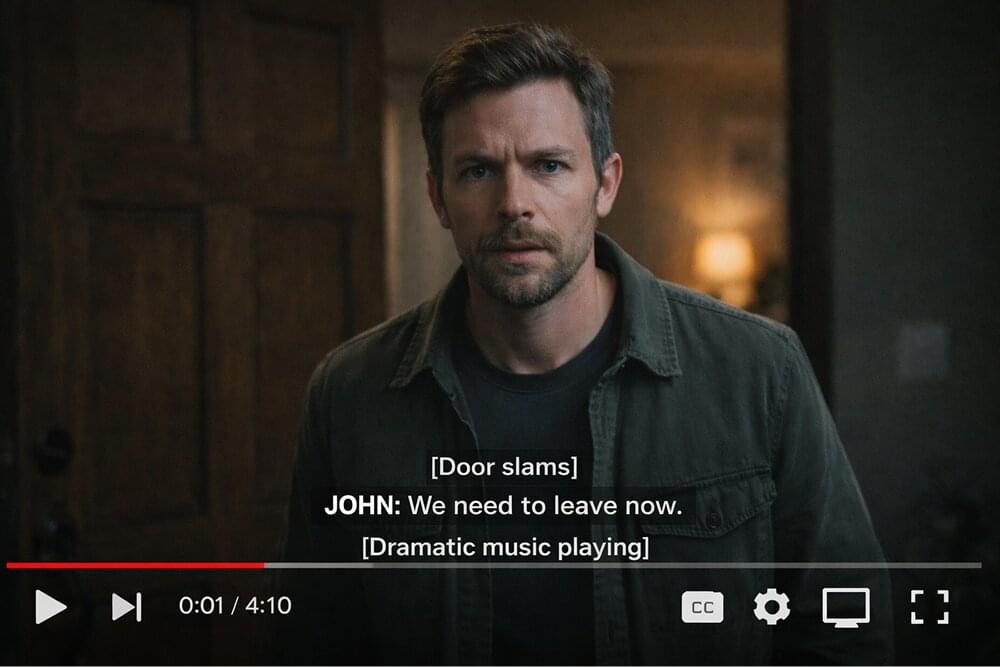
This lets viewers understand the full meaning of the scene even if they cannot hear the sound. Captions are commonly used in movies, online videos, educational content, and streaming platforms.
Our guide on Closed Captioning vs. Subtitles breaks down exactly when to use each.
How captions work?
To truly get what are captions from a creator’s perspective, you have to look at how they are delivered. When you upload a video to YouTube or LinkedIn, there are two primary ways the text reaches your viewer’s eyes:
1. The Sidecar method (Closed Captions)
You upload your video and a sidecar file, i.e. a separate text file (usually an SRT or VTT). When a user clicks the “CC” button, the player fetches that sidecar file and overlays the text in real-time. This is why you can often change the size or color of the text on YouTube or Netflix because the text is not part of the video pixels.
2. The “burned-in” method (Open Captions)
The text is rendered directly into the video frames during the export process in a video editor. In this case, the captions are just pixels. They can not be turned off, but they are guaranteed to show up exactly as you designed them, regardless of the player used.
3. How captions are synchronized with the video?
So, most people think captions are just “text on a screen”. But every Captions block has a “Start” and “End” timestamp (down to the millisecond) that tells the video player exactly when to show and hide the text. When the video player does the Parsing (read, sync, render) of the Captions file, the text on screen matches the speaker’s lips perfectly.
How long should a caption be?
For captions to be effective, they must follow human reading speed and visual constraints. In the industry, we call this Line Length and Reading Rate. Here are the three technical standards used by pros:
The character limit (CPL)
The industry standard is 32 to 42 characters per line.
Aim for a maximum of two lines per caption block. Anything more starts to cover the speaker’s face or essential visual details.
The reading rate (WPM)
You have to give the brain enough time to process the words. It is measured in Words Per Minute (WPM) or Characters Per Second (CPS).
- The standard is between 150 and 180 WPM.
A single caption block should stay on screen for at least 1 second (even for a one-word “Yes!”) and no longer than 7 seconds.
The “Chunking” method
If your captions are too long and dense, viewers will get overwhelmed and drop off. You should break lines at natural linguistic pauses.
| “The quick brown fox jumped over the lazy dog.” | ❌ |
| “The quick brown fox jumped over the lazy dog. “ | ✅ |
Writing captions is a balancing act. If the text is too long, the reader can not keep up with the action; if it is too short, it becomes a flickering distraction.
Why your content is invisible without captions?
If you are investing hours into scriptwriting, lighting, and editing, but skipping the captioning process, you are essentially launching a ship without a sail. In the high-velocity digital landscape of 2026, captions are the bridge between “scrolling past” and “stopping to watch.” here’s why.
The “Mute” Factor: winning the first 3 seconds
Industry data continues to show that over 80% of social media videos are consumed without sound.
When a user encounters your video, you have exactly three seconds to hook them before they keep scrolling. If those three seconds are silent and lack text, your message is lost. Captions act as a visual “hook,” that forces the viewer to stop and listen with their eyes.
Video SEO
There is a massive technical advantage to captions: Search Engine Optimization (SEO). While AI has come a long way, Google and YouTube’s crawlers still cannot “watch” a video to understand its nuances. They rely on metadata. When you upload a caption file (like an SRT), you are providing a full, text-based transcript that is indexed by search engines. This means:
- Your video can rank for long-tail keywords spoken in the dialogue.
- You increase the “watch time” metric, which tells algorithms your content is valuable.
- Your content becomes discoverable to a global audience searching for specific solutions.
By adding captions, your content ranks for keywords better while your viewers get control over the text size and style.
How accessibility increases via captions?
Accessibility separates professional brands and content creators from amateurs because they see “inclusion as a growth strategy”.
When you provide high-quality captions, you are not just helping the 1.5 billion people globally who live with some form of hearing loss; you are also supporting:
- Non-native speakers: Who may understand your written words better than a fast-paced or accented vocal track.
- Neurodivergent viewers: Many individuals with ADHD or auditory processing disorders find that captions increase their focus and retention.
- Language learners: captions are an incredible tool for comprehension to language learners.
Companies and content creators that prioritize captions and accessibility, see higher brand loyalty and better user retention rate on their videos.
Legal compliance
WCAG 2.2 and ADA standards have made captions compulsory for all prerecorded and live content in the US. You add captions to your content, you become “accessible by default”, you protect your brand from legal friction and your audience knows that you value universal design.
For organizations and content creators in the European market, as of June 28, 2025 European Accessibility Act (EAA) has mandated the captions for audio-visual media as well.
Conclusion
Manually typing captions and timestamps is old. So, what are captions in 2026? Try using tools like SubtitleBee and utilize advanced AI to transcribe and synchronize your videos in seconds. You get the accuracy of a professional stenographer with the speed of an automated tool to enhance your video reach.
FAQs
What is a caption in a video?
A video caption is a synchronized text track that converts ALL the audio elements of a video into readable text. Their purpose is to provide a complete experience for viewers who cannot hear the audio, covering not just the spoken dialogue but also essential sound effects, speaker identifications, and musical cues.
What are good captions?
Good video captions are 100% accurate and easy to read. They are formatted to perfectly match the tone of the content and are perfectly aligned with the video. Good post captions support your content by offering a window into who you are or what your content is about.
What is AVA Me?
Ava (accessible via ava.me) is a real-time AI captioning and transcription app designed particularly for the deaf and hard-of-hearing. It acts as a “personal captioner” in your pocket. AVA Me uses a smartphone’s microphone to instantly transcribe face-to-face conversations, group meetings, or even phone calls.



Add and translate your subtitles to more than 100 languages with high accuracy
Our solution
SubtitleBee
Make your video understandable by using SubtitleBee for free
Start now for freeTop Articles

Getting Started with AI-Powered SubtitleBee

3 Effective Ways To Add Subtitles To Video Online Without Watermark
VEED vs. Kapwing: Which Subtitle Generator wins?
Kapwing vs. SubtitleBee: Which subtitling tool should you choose?

5 Top Verbit Alternatives for Transcription