



video tutorials for social media
Arabic to English translation: A how-to-guide for video subtitles
Arabic is the world’s fourth most spoken language, yet much of its digital content remains confined to the Middle East and North Africa (MENA). For Arabic content creators in 2026, it is a simple logic that they must opt to translate Arabic to English video subtitles. This is because they know if their video is only available in Arabic, they are cutting themselves off from 1.5 billion people who consume content in English.
English captions are the bridge that make your content accessible, searchable, and engaging for a global audience. Translating Arabic to English video subtitles is a complete format shift from a Right-to-Left (RTL) script to a Left-to-Right (LTR) format. Tools like SubtitleBee remove the complexity of this process and let you generate, edit, and translate your subtitles in one single dashboard. Read on to learn everything about how to translate Arabic to English video subtitles in 2026.
Read more: How to translate English to Arabic video subtitles
Table of Contents
- Why translate Arabic subtitles to English video subtitles?
- How to translate Arabic to English video subtitles
- How to create high-quality Arabic to English translation?
- Conclusion
- FAQs
Why translate Arabic subtitles to English video subtitles?
English subtitles expand your audience farther from the Middle East and North Africa. They make your Arabic content understandable to the 1.5 billion people who speak English globally. Here is why English subtitles can be great for your videos:
- English is the main language of the internet. By adding English subtitles to Arabic video, you can suddenly connect with billions of viewers across Europe, America, and Asia.
- Most people watch social media videos on mute while commuting or in public places. If an English speaker sees an Arabic video without captions, they will scroll past it in seconds. Subtitles keep them watching.
- Google and YouTube search engines can not listen to your audio, but they can read your subtitle files. Including English keywords in your captions helps your video show up when people search for those topics globally.
- Using English captions means you are following international content accessibility standards and respecting all viewers especially deaf or hard of hearing viewers.
How to translate Arabic to English video subtitles
Follow these steps to translate your Arabic video subtitles to English subtitles in a few steps:
1. Create an account
Visit SubtitleBee and sign up using your email. It is an entirely browser based platform, which means you do not need to download or install any software or plugins to start your project.
2. Upload video
SubtitleBee supports all major video formats, including MP4, MOV, AVI, and MKV. Once you log in, click the “Upload New File” button.
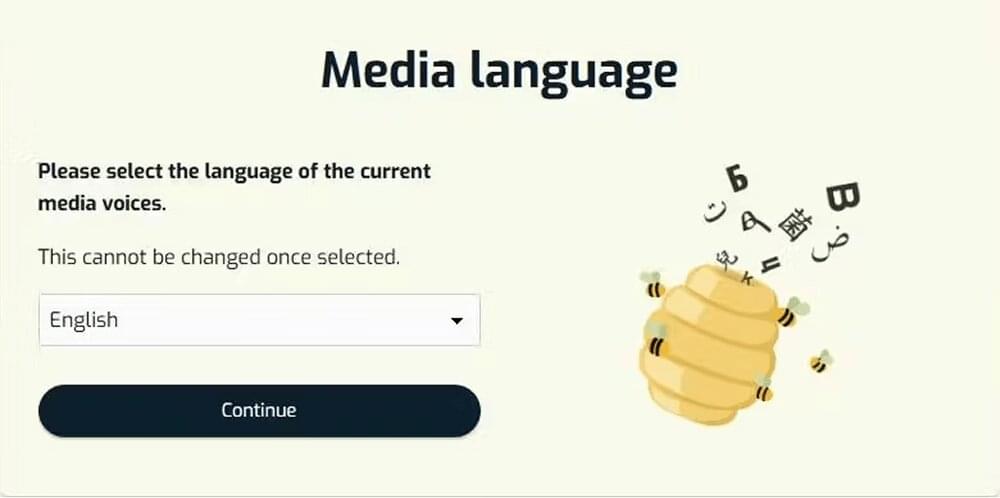
It asks you to provide the original language of your video content. By default the selected language is English. Since my video is in Arabic language and I want to translate Arabic subtitles, I have selected Arabic here. Press ‘Continue’.
In the next window, to upload your video you can:
- Drag and drop the file
- Use the browse option
- Paste the YouTube video link
3. Review and edit the Arabic transcription
After uploading, SubtitleBee’s smart AI video translator automatically creates a raw Arabic transcript. A quick review confirms that the Arabic transcription text is 100% accurate.
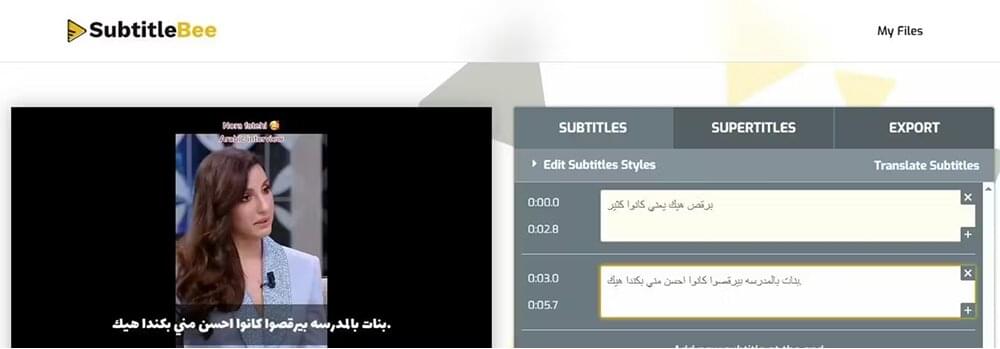
Use the built-in editor to fix any misinterpretations of names or technical terms before moving to the translation phase. Do not skip this step.
4. Translate to English subtitles
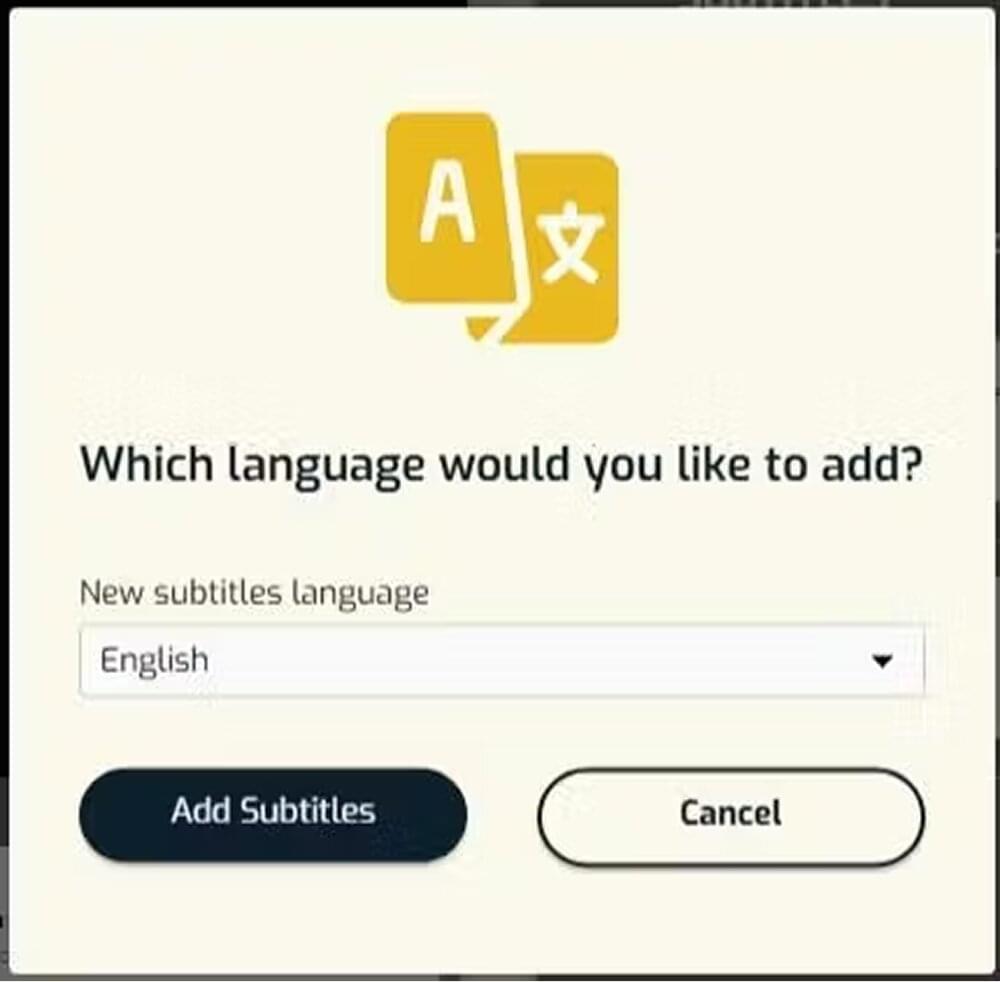
Once you have edited the Arabic transcription, click the “Translate Subtitles” option to convert Arabic subtitles to English.
Select “English” from the dropdown menu. Click “Add Subtitles,” and the system will automatically generate the English subtitles. You will now see both the Arabic and English subtitle tracks on your dashboard.
You can also use “Edit Subtitle Styles” if you prefer to change the color or style of the subtitles’ font.
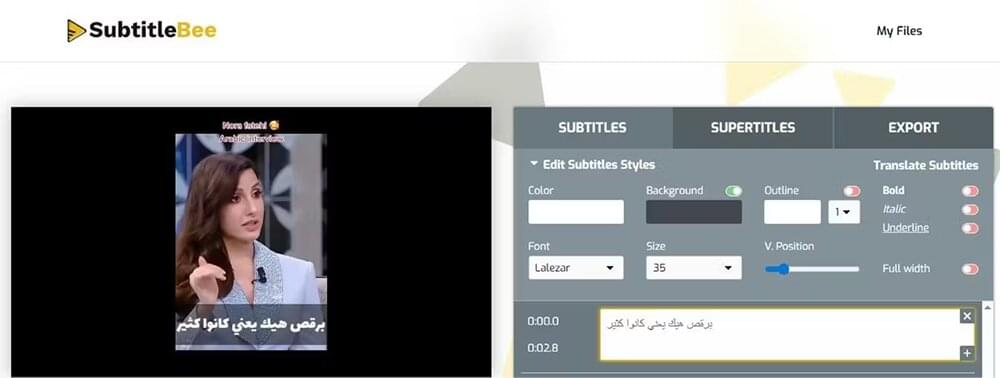
5. Export video
Go to the “Export” tab. Assign a project name. Choose “English” from the “Language of subtitles to export” dropdown. This ensures the English subtitle track is the one used for the final file.
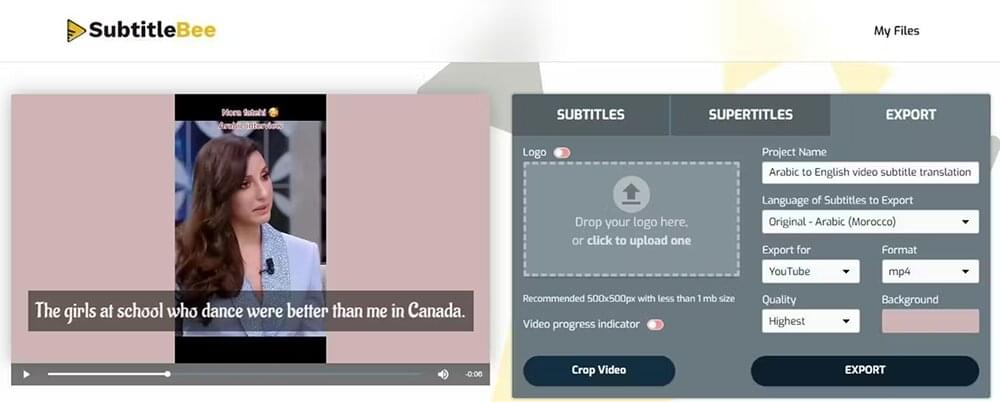
If you download the video, it will be with the subtitles “burned-in” (permanent on the screen). You can also export a standalone subtitle file like an SRT, ASS, TXT or VTT.
How to create high-quality Arabic to English translation?
Arabic is tricky for basic AI because people rarely speak the way they write. To get high-quality English subtitles, you need to manage these three specific challenges.
Transcreation vs. Literal Translation
Arabic is a descriptive and metaphorical language. A word-for-word translation often results in robotic English that feels unnatural. Consider these examples for the context:
Phrases like Inshallah (God willing) or Ya’ni (You know/I mean) appear frequently in Arabic. In professional English subtitles, these are often omitted or “transcreated” to maintain a clean reading speed.
An Arabic metaphor like “He is like the moon” is often better translated as “He is radiant” or “He is handsome” depending on the context.
Managing character expansion and reading speed
For Arabic to English translation, you will notice that the amount of space the text takes up on the screen changes drastically. This is because the two languages handle grammar and social cues differently.
Here is one example of how word count and character space shift when moving from Arabic subtitles to English subtitles.
| Arabic Word | English Translation | Word Count Ratio |
|---|---|---|
| سأخبرك (Sa’ukhbiruka) | I will tell you | 1 word : 4 words |
| للمسافرين (Lil-musafireen) | For the travelers | 1 word : 3 words |
In such a scenario, you have to make sure the English subtitle stays on the screen long enough for the viewer to read all the words, even if the speaker only said one word in Arabic.
Take the example of Arabic greetings and formal speech which include more flowery descriptions. Whereas English is shorter in these situations.
| Arabic Phrase | English Translation | Character Count |
|---|---|---|
| في أمان الله (Fi amani Allah) | Goodbye | 13 chars : 7 chars |
| بارك الله فيك (Baraka Allahu feek) | Thank you | 15 chars : 9 chars |
You will need to adjust the timing so the English subtitle does not disappear too quickly while the speaker is still finishing their sentence in Arabic.
Solve the RTL-to-LTR formatting
Arabic is written from right to left, while English is left to right. This often causes periods, question marks, or exclamation points to end up on the wrong side of the sentence. It’s better to always review the subtitles.
Conclusion
Translating Arabic to English video subtitles is the most effective way to scale your digital presence outside of the MENA region. While the linguistic differences between the two languages are vast, the process is straightforward when using the right AI tools like SubtitleBee. However, I encourage you to never skip the subtitle review, no matter the tool you use.
More guides:
How to Translate Video to English Subtitles
How to translate English to Korean video subtitles?
FAQs
How can I translate an Arabic video to English subtitles?
Upload your video to SubtitleBee and select Arabic as the source language. SubtitleBee’s AI will generate an Arabic transcript. Review this transcript and then click the Translate button and select English. Arabic subtitles will be translated into English subtitles. You can then export the video with English subtitles burned-in or download as an SRT file.
Can I translate video subtitles?
Yes, you can. Simply upload the video to SubtitleBee and let the smart AI handle the translation for you.
Can I use ChatGPT to translate subtitles?
You can use ChatGPT. It is excellent at understanding the context and “transcreating” phrases. To use it, you would need to provide the subtitle text file including the timestamps and then provide a prompt.
However, It won’t “hardcode” those subtitles onto your video or check if the translated text is too long for the screen.
Does the AI handle Arabic dialects like Egyptian or Levantine?
Yes. Modern AI subtitle generators are trained on diverse datasets. To get the best results, review the Arabic source transcription before clicking “Translate” to English.
What is the best subtitle format for YouTube?
The SRT (SubRip Subtitle) file is the industry standard for YouTube. It allows you to upload the English translation as a separate file and allows YouTube’s search engine to index your content for English-speaking users.



Add and translate your subtitles to more than 100 languages with high accuracy
Our solution
SubtitleBee
Make your video understandable by using SubtitleBee for free
Start now for freeTop Articles

Getting Started with AI-Powered SubtitleBee

3 Effective Ways To Add Subtitles To Video Online Without Watermark
VEED vs. Kapwing: Which Subtitle Generator wins?

Kapwing vs. SubtitleBee: Which subtitling tool should you choose?

5 Top Verbit Alternatives for Transcription