



video tutorials for social media
How to translate English to Arabic video subtitles?
Every content creator wants to connect globally and what better way is other than uploading the content with transcription and translating it into multiple languages.
This does wonders when it comes to content reach and engagement. Especially if you are someone who creates content in the English language, it’s a good idea to translate English into popular languages like Spanish, Korean, Arabic etc. In this blog post, we will explain how to translate English to Arabic video subtitles online.
Let’s learn how you can easily translate English to Arabic video subtitle using SubtitleBee.
Why translate English to Arabic video subtitles?
Since Arabic is the world’s fourth most spoken language and is spoken by around 422 million people worldwide, it would be wise to get Arabic video subtitles. This would help your content reach not only to the English viewers but the video will also be accessible to viewers in UAE, Bahrain, Saudi Arabia, Egypt and throughout the MENA region.
Along with cultural and traditional relevance, Here’s why translating English to Arabic video subtitles makes sense for your brand.
1. Business expansion: Arabic countries especially the Middle East is a hub of commerce and tourism. Adding Arabic video subtitles will break down the language barrier for a big number of consumers and investors, and can definitely expand your business reach.
2. Digital growth: While internet usage is high in Arabic speaking countries, less than 5% of global web content has Arabic translation. This gap offers a significant opportunity for content creators to engage Arabic audiences.
How to translate English to Arabic video subtitles?
Use an AI-powered tool like SubtitleBee to make the process of translating English subtitles to Arabic fast and reliable. Its AI video translator will give you the audio transcription of your content in the Arabic language in just a few minutes. You do not need to be an Arabic linguist; all you need to do is follow these simple steps.
1. Create an account
Open SubtitleBee and sign up with your email for free. It works in the browser, and therefore, no downloads are required. You can use the free trial to try out SubtitleBee and its features.
2. Log in to your account
Once you are in, click the “Upload new file” button. You will be asked to choose the Media Language.
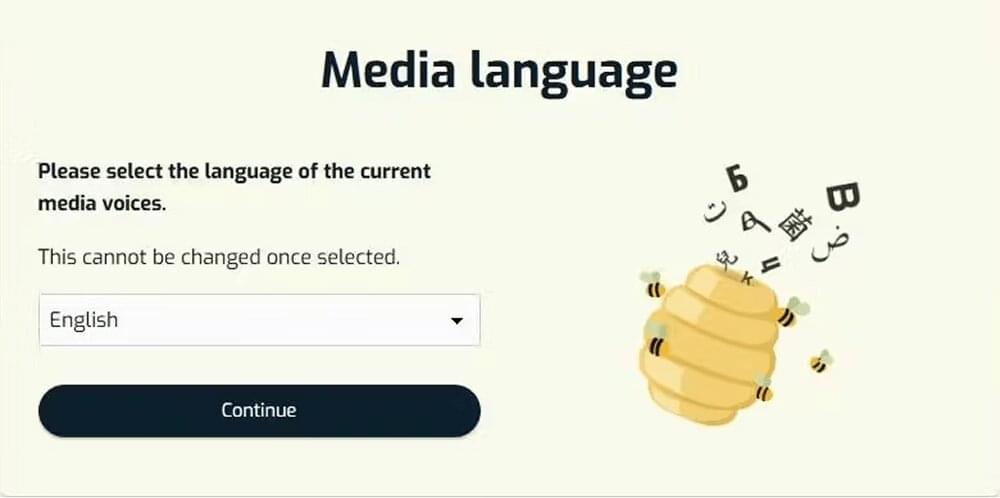
Select “English” here, because that is the original language of your video.
3. Upload video
Now drop a file from your computer or paste a link from YouTube or Vimeo. The platform supports MP4, MOV, AVI, WMV and WebM video file types.
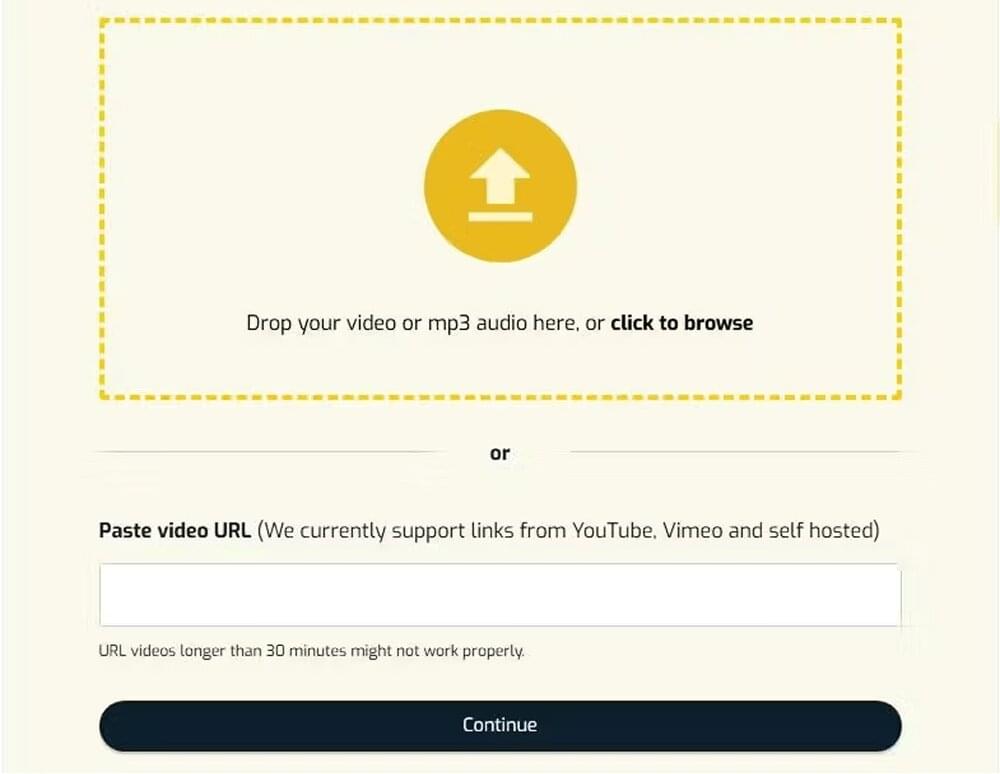
Once you click the “Continue”, SubtitleBee’s AI will immediately start “listening” to the audio to generate the English transcription first.
4. Edit English subtitles
When the transcription process is complete, you will be taken to the SubtitleBee dashboard, where you will see the automatically synced English subtitles for your video.
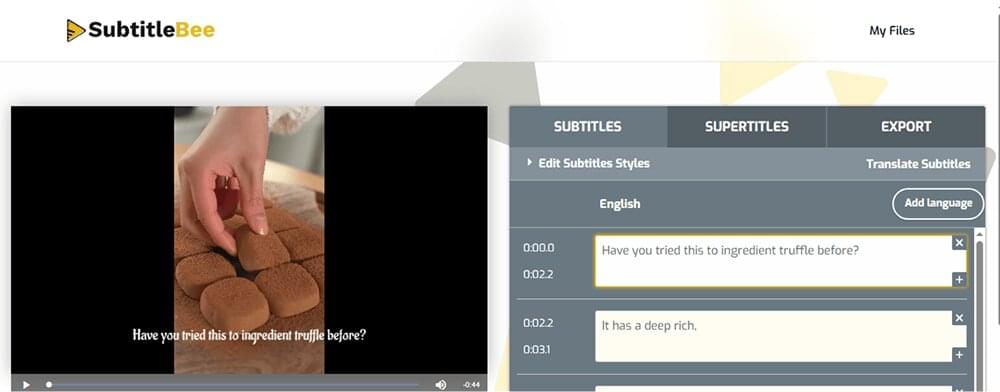
Before you move on to add Arabic subtitles to your video, review the English subtitles for AI errors. Only through good reviewing, you will enable the Arabic subtitles to stay with the real meaning and purpose of your actual content.
5. Translate to Arabic subtitles
Now for the Arabic translation, click on “Translate Subtitles” in the dashboard and select Arabic from the drop down menu. Within seconds, the subtitle generator will generate Arabic subtitles of the English transcript.
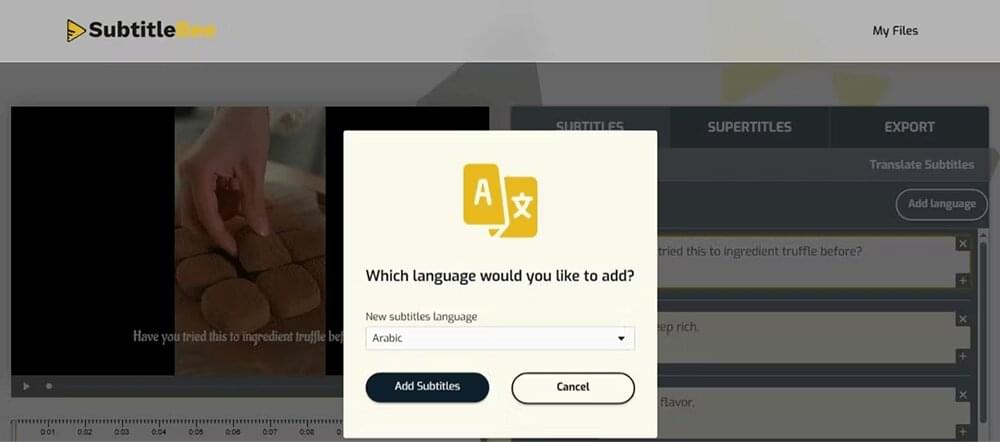
You will see subtitles in two different languages: English subtitles and Arabic subtitles. Review the Arabic subtitles for any misspellings.
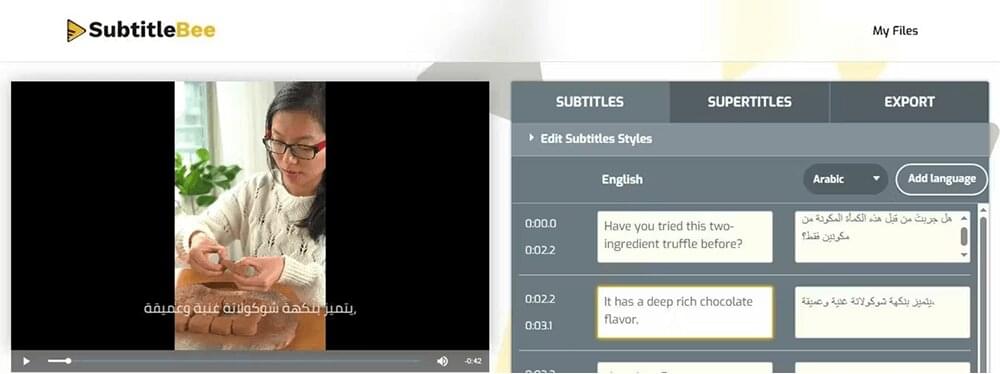
You can also use “Edit Subtitle Styles” if you prefer to change the color or style of the subtitles’ font.
6. Export video with Arabic subtitles
Once you are done, go to the Export tab and name the video. Select Arabic as the subtitle language before exporting your video. Use other features available as needed.
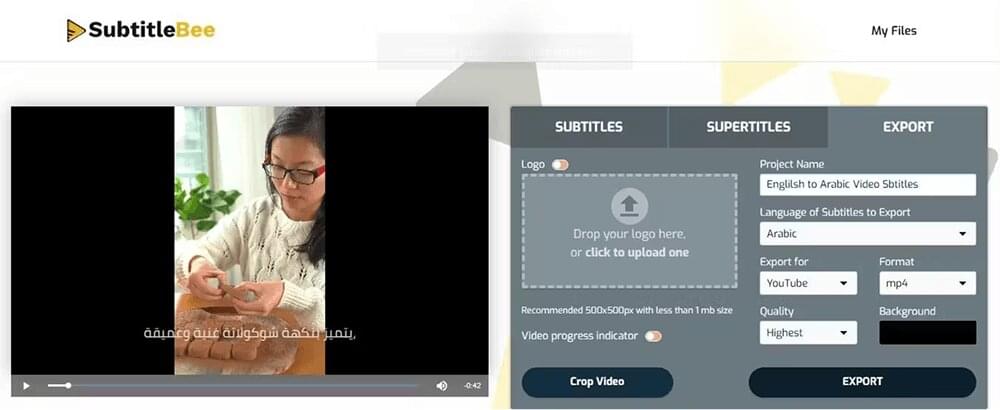
Press the “Export” button when you are done.
You can now download the video with timesynced and burned-in Arabic subtitles. You can also download the Arabic subtitle file as an SRT, VTT, ASS, TXT file to upload them as “Closed Captions“ on any social media platform.
Why is rechecking the English to Arabic video subtitles important?
Arabic is a language that is deeply rooted in context, gender and cultural rules and values. It also means that there can be more than one form and meanings of one Arabic word. And then there are +30 Arabic dialects. It is also noticeable that almost 70% of viewers notice grammar or noun errors which reduces their enjoyment.
Here is why it is a good idea to review the Arabic subtitles before you export them:
- Let’s first take the example of a simple English sentence “Are you ready?” and translate it into Arabic. In English, the phrase is gender-neutral. Now Arabic has a highly gendered grammar. In Arabic, the translation changes completely depending on whether the speaker is addressing a man or a woman. A literal AI translation might default to the masculine form, which can feel jarring or even disrespectful if your video features a female lead or is targeting a female audience.
Are you ready?”
The masculine translation will be:
!هل أنت مستعد؟ (Hal anta musta’id?)
The feminine translation will be:
!هل أنتِ مستعدة؟ (Hal anti musta’ida?)
- Because Arabic is a Right-to-Left (RTL) language, AI systems might misplace punctuation marks like exclamation points or question marks etc.
These are the two main reasons why direct Arabic translation alone is not always enough when you opt to translate English subtitles to Arabic video subtitles.
All this sometimes might lead you to tweaking the Arabic translation to keep the essence of the original dialogue instead of keeping the word-to-word translation given by AI. A quick review in the SubtitleBee editor allows you to snap these errors and give you more accurate, professional and highly engaging subtitles.
What type of content must be translated into Arabic?
YouTube is the undisputed #1 platform for viewers in Saudi Arabia and the UAE and people are not just scrolling YouTube on their phones, they are watching it on big-screen TVs in their living rooms. With an audience that is loyal, you can not skip to translate YouTube videos to Arabic if you want to actually connect with them.
Let’s look at what actually works for Arabic audiences and for which type of content you must be translating to Arabic subtitles.
- Gaming content: Gaming is massive in the MENA region. Big names like SHoNgxBoNg and AboFlah have millions of loyal Arabic fans because they know how to keep things exciting. If you are a gamer, a streamer or someone who makes gaming content then adding Arabic subtitles is your fastest way to get into this high-energy community.
- Tech brands and gadget sellers: People in the Arab world are into luxuries, gadgets, and tools. If you are a content creator in this niche, or a brand looking to engage these viewers, reach out to these viewers through your videos and add Arabic subtitles.
There is also a huge appetite for Turkish and Syrian dramas across the Arab world. Shows that have long, complex plots are liked there mostly. The same goes for major news videos and music content.
Conclusion
Translating English videos into Arabic subtitles does not have to be difficult. Use the latest AI with SubtitleBee to make translations and transcriptions a piece of cake. With accurate subtitles, your content becomes accessible to a wider audience.
Related Reads:
How to translate video to English subtitles
How to translate Hindi to English subtitles
FAQs
How to create Arabic subtitles?
Upload video to SubtitleBee and select the language your video is in. It will automatically add captions to your video. Go to the ‘Translate subtitles’ option and select “Arabic” from the dropdown menu to create Arabic subtitles automatically.
How do you say ‘subtitles’ in Arabic?
In Arabic, the word for subtitles is ترجمة (pronounced tar-ja-ma).
While this word literally means “translation,” it is the standard term used across all streaming platforms and video editors for on-screen subtitles. If you are looking for the plural form, it is ترجمات (tar-ja-mat).



Add and translate your subtitles to more than 100 languages with high accuracy
Our solution
SubtitleBee
Make your video understandable by using SubtitleBee for free
Start now for freeTop Articles

Getting Started with AI-Powered SubtitleBee

3 Effective Ways To Add Subtitles To Video Online Without Watermark
VEED vs. Kapwing: Which Subtitle Generator wins?
Kapwing vs. SubtitleBee: Which subtitling tool should you choose?

5 Top Verbit Alternatives for Transcription