



video tutorials for social media
Subtitle translator: How to translate subtitles in any video
As a content creator, if your viewers don’t speak your language, that’s a huge gap you need to fill, which increases the importance of subtitle translators. When subtitles are only in one language, you’re quietly closing the door on viewers who would happily watch, share, and follow if they could just follow along.
Translating subtitles can help you with this. However, it is a time-consuming task, and most online tools drop you onto a blank page with no explanation. This guide is here to help you with that.
You’ll learn what subtitle translation is, how to translate, which file formats and platforms to watch out for, and how to keep your translations accurate. For this, you will need a good subtitle translator such as SubtitleBee. It translates up to 120+ languages, and you can start adding translated subtitles for free.
What is subtitle translation?
Subtitle translation simply means converting the on-screen text of a video from one language into another. You take the subtitles a viewer would read in the original language and rewrite them so a different audience can follow along just as easily.
It sounds simple, but there’s more to it than swapping words. Good subtitle translation preserves the timing so each line still matches what’s being said. It respects the reading speed so viewers can keep up, and adapts idioms or cultural references that wouldn’t make sense word for word.
There is one more thing. Translation is not the same as transcription. Transcription turns spoken audio into text in the same language, while translation converts that text into a different language.
In most workflows, the two work together: you transcribe a video first to get the original subtitles, then translate those subtitles into your target languages.
Related: What is the difference between transcription and translation
Why translate your subtitles?
You might be thinking why is translating subtitles necessary? It is not just about accessibility. Here is why you should do it:
1. Reach a global audience. A video with subtitles helps you reach people who don’t speak your language. You don’t have to reshoot or rerecord anything for a different audience.
2. Improve accessibility. Subtitles help viewers who are deaf or hard of hearing. Additionally, translated subtitles help non-native speakers who understand the written language better than the spoken one.
3. Boost engagement and watch time. Many people watch videos with the sound off, especially on social feeds. Readable, translated text keeps them watching instead of scrolling past. On Instagram, you can also translate messages, videos, and images directly in the app.
4. Support language learning. Translated and dual-language subtitles are a favorite tool for learners who want to connect what they hear with what they read.
How to translate subtitles (step by step)
Subtitle translator guides rarely describe this process step-by-step. But on this blog, you’ll find all instructions regarding each stage of video translation. An AI-powered subtitle translator like SubtitleBee can translate subtitles in a few steps quickly.
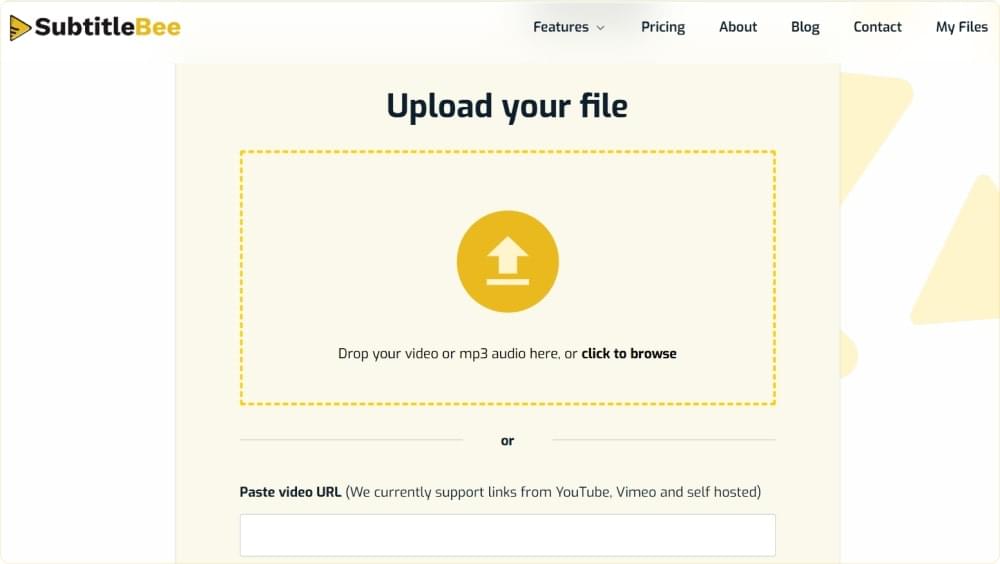
Step 1: Upload your video or subtitle file
Visit our upload page and add your video. If you already have a subtitle file, you can upload it as well. SubtitleBee supports many video and subtitle file formats, thus no conversion is required.
Step 2: Generate the original subtitles
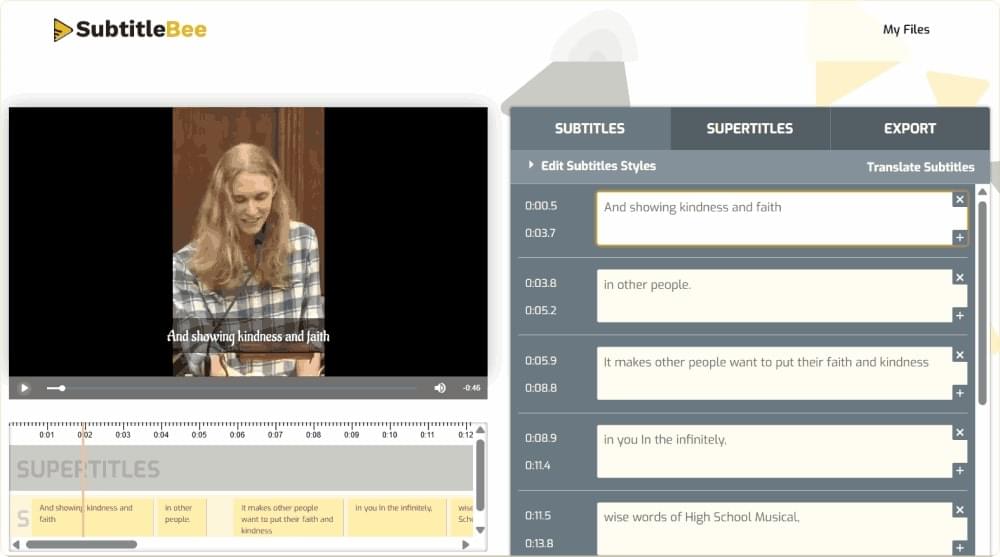
If your video does not contain subtitles, then they will be generated automatically by AI. Subtitles created with SubtitleBee are 99% accurate and are delivered within minutes. As a result, you’ll receive a perfect set of original-language subtitles to translate.
Step 3: Choose your target language
Select which language you want to translate your subtitles into. At SubtitleBee, more than 120 languages are supported.
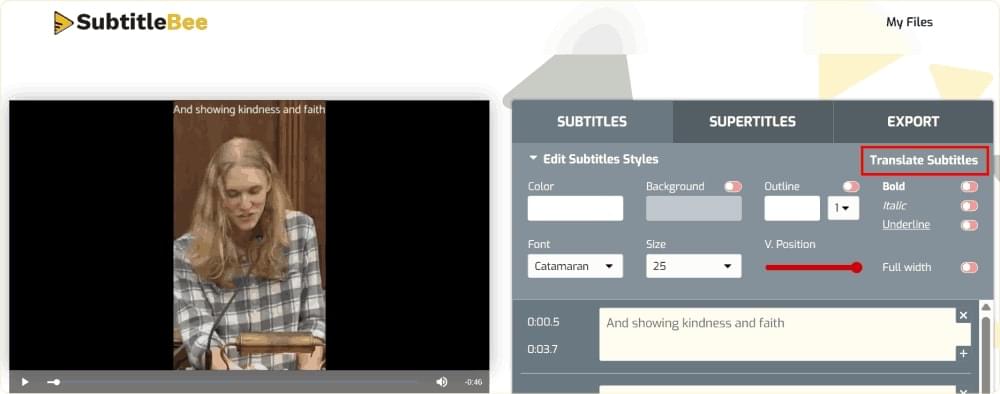
You can easily translate your videos into Spanish, Arabic, Japanese, or any other language you want.
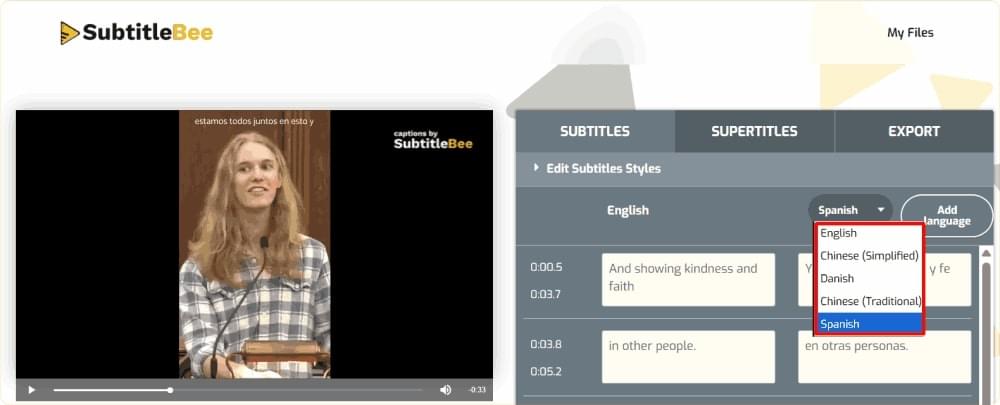
Step 4: Review and edit for accuracy
Once the translation is generated, do proofreading of translated text. The AI will do the major part of the job, but a bit of polishing and fixing some names/idioms might help.
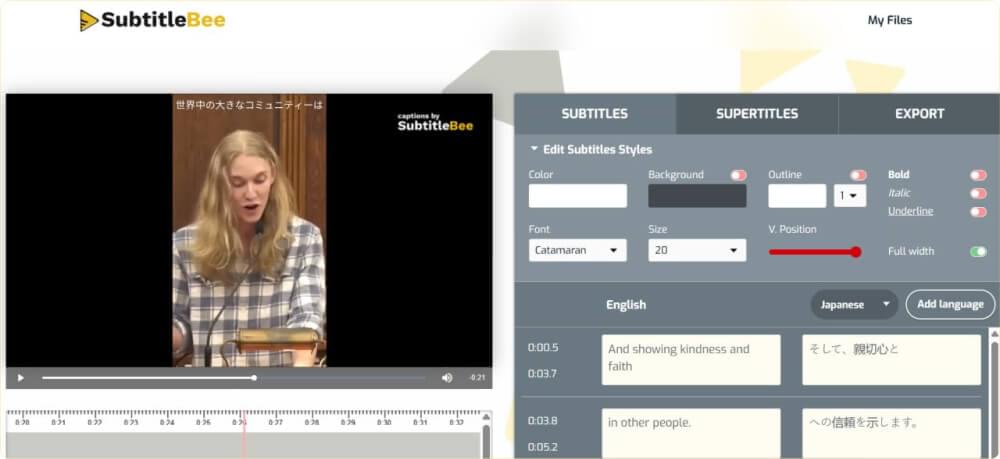
Step 5: Style and export
Now you need to make the subtitles look good with your video. So adjust the font and the size of the words. Also change the color and where the subtitles are, on the screen. You can put the subtitles into the video or you can download them as a separate file and use the subtitles somewhere else.
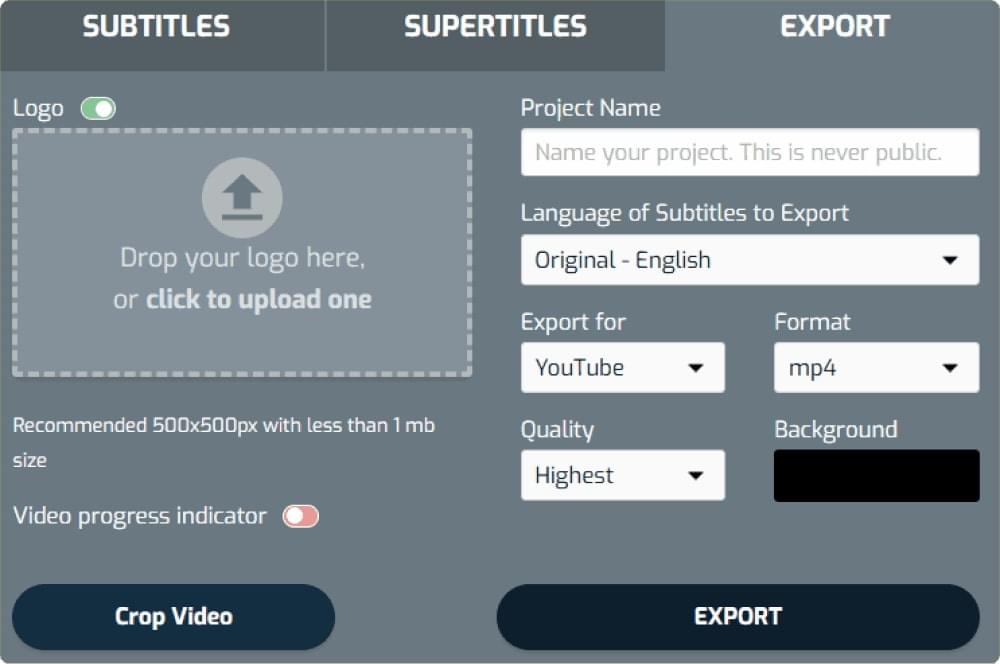
That’s the entire process. For a worked example, see how to translate a video to English subtitles, or explore the full subtitle translation feature to see every supported language.
AI subtitle translator vs manual translation
There are two ways to translate subtitles: do it yourself (or hire someone), or let an AI subtitle translator handle it. Each method has its advantages.
Manual translation gives your subtitles a human touch. A professional translator can catch cultural references, tone and wordplay that a computer program might miss. However this method is expensive and time consuming especially when you need to translate into languages.
On the other hand, an AI subtitle translator can translate many languages very quickly and at a low cost. Modern AI technology works well and tools designed specifically for subtitles can handle timing and formatting automatically.
Related: Auto subtitling technology
So what is the best method? For video creators, the best approach is to use a combination of both methods. Let the AI subtitle translator do most of the work and then have a review the output before publishing it. This way you can get your subtitles done quickly and at a scale without sacrificing quality.
The review step is important because small errors can slip through easily when translating into different languages. You can also learn about it well from these transcription and translation mistakes to avoid.
Translating subtitle files (SRT and other formats)
Sometimes you already have a subtitle file. You just need to translate it into another language. The common format for subtitle files is the SRT file, which is a simple text file that pairs each line of dialogue with a timestamp.
When you translate an SRT file you should only translate the text. Leave the timestamps alone. If the timing gets changed your subtitles will no longer be in sync with the audio. A subtitle translator can handle this by automatically translating the lines while keeping the timing data exactly the same.
If SRT files are new to you, these guides cover the basics:
Also read: What is an SRT file and How to create SRT file subtitles
Besides SRT files you may also come across formats, like VTT, which is commonly used for web videos and ASS which is used for styled subtitles. The good news is that a capable tool can read and translate these formats without you needing to convert them first.
Translating subtitles on different platforms
Translation of a video also depends on the platform you are posting it to.
YouTube
YouTube offers some built-in caption tools, but they’re limited, and the quality of auto-translation varies. So many creators use a tool to translate their subtitles and then upload the finished file. This way the subtitles look more professional.
Related: How to translate a YouTube video
TikTok and short-form video
Many people watch videos on mute. So if you add subtitles it makes your video more accessible. Translated subtitles help your content travel across language barriers and reach new audiences in the feed.
Movies and long-form video
For movies and long videos it’s very important to get the translation and timing right. If you translate from a subtitle file everything stays synced from start to finish.
Subtitle translation for specific languages
Some languages are special. They have scripts, reading directions or sentence structures. SubtitleBee can handle over 120 languages. Here are some guides for pairs:
- How to add Arabic subtitles to videos: for right-to-left script considerations.
- How to add Spanish subtitles to a video: one of the most requested pairs.
- Translate Japanese to English subtitles: handling a different writing system.
- How to translate Hindi to English video subtitles: a high-demand pairing.
- Translate English to Korean: popular for K-content fans and creators.
- Chinese to English subtitle translator: for one of the world’s largest audiences.
Whatever pair you’re working with, the process stays the same: generate, translate, review, export.
Tips for accurate subtitle translation
AI can translate most of the content for you, but a few tips can help you polish your results.
Consider the context
Keep context in mind. Translate complete thoughts, not individual words. A line might make sense on its own. It can still feel off if it doesn’t match what came before it. Subtitle translation requires understanding the conversation.
Focus on reading speed
Watch your reading speed. Translated text can be longer than the original. If a line is too long viewers won’t be able to finish reading it before it disappears. So trim the text where you can without losing the meaning. This will help viewers keep up with the video.
Avoid idioms
Adapt idioms instead of translating them literally. A phrase that sounds natural in one language can sound strange in another. Always focus on the meaning, not the words. This will help you create natural-sounding subtitles.
Sync the timing
Keep timing in sync. Make sure each translated line still matches the audio. Good tools can preserve timing automatically. Its always a good idea to double-check. This ensures that the subtitles are in sync with the video.
Proofreading
Proofread before publishing. A quick review can catch terms and small errors that automated systems might miss. This is the effective way to improve the quality of your subtitle translation.
Translate your subtitles with SubtitleBee
In the past, translating subtitles used to mean hours of manual work or an expensive freelancer. But it doesn’t anymore. An AI subtitle translator can help you reach a global audience without slowing down your workflow.
SubtitleBee can generate and translate subtitles in 120+ languages with up to 99% accuracy. You only need to upload your video, pick your languages, review the results, and export; that’s it.
So, are you ready to take your content to new heights? Try SubtitleBee for free and start translating your subtitles now.
FAQs
How do I translate subtitles?
You can translate subtitles by uploading your video or subtitle file to SubtitleBee. First, you will need to generate the original subtitles of the video. Then choose your target language, review the subtitles, and export. The whole translation process will take just a few minutes with SubtitleBee.
Are subtitle translators free to use?
Many subtitle translators offer free options or free trials, including SubtitleBee. It means you can try out the subtitle translators for free, then upgrade if you need more languages or extra features.
How do I translate a subtitle file?
Copy and paste the subtitles without the timestamps into a translation tool like Google Translate. You can also use AI tools like ChatGPT or Claude to translate the file. However, it is recommended to use a dedicated tool like SubtitleBee to generate the captions in the original language first and then translate them for maximum accuracy.
Can you translate subtitles automatically?
Yes. AI-powered tools like SubtitleBee support the automatic translation of subtitles across 120+ languages. However, we recommend reviewing the output for accuracy
How long does subtitle translation take?
An AI subtitle translator ensures that translating subtitles takes just a few minutes, even for longer videos. On the other side, manual translation can take hours or days, depending on the length and the number of languages.
Is AI subtitle translation accurate?
Yes, AI subtitle translation has become highly accurate. Tools like SubtitleBee can reach up to 99% accuracy. You can get even better results by giving the translation a quick human review to catch names, idioms, and topic-specific terms.
Which subtitle translator is the best?
SubtitleBee is the best subtitle translator because it is a user-friendly dashboard and supports 120+ languages. You will get accurate subtitle timing and export the video in different formats and aspect ratios.



Add and translate your subtitles to more than 100 languages with high accuracy
Our solution
SubtitleBee
Make your video understandable by using SubtitleBee for free
Start now for freeTop Articles

Getting Started with AI-Powered SubtitleBee

3 Effective Ways To Add Subtitles To Video Online Without Watermark
VEED vs. Kapwing: Which Subtitle Generator wins?
Kapwing vs. SubtitleBee: Which subtitling tool should you choose?

5 Top Verbit Alternatives for Transcription