


video tutorials for social media
What does closed caption mean? (CC and subtitles explained)
You have probably seen the small “CC” button on social media platforms like YouTube or streaming platforms like Netflix. Some of the modern TV remotes also has the CC button nowadays.
But what does closed caption mean, exactly? And is it the same thing as subtitles?
These are some of the common questions regarding closed captions. Many viewers use the CC button without fully understanding what it does. Similarly, many also confuse closed captioning with regular subtitles.
But knowing what does closed caption mean and how is it different from subtitles is important for content creators, filmmakers, and anyone who uses captions to follow along with dialogue.
By the end of this article, you’ll have a clear idea about the closed caption meaning in plain language. Moreover, you will also learn how closed captions work, where you will encounter them (from Netflix to AMC theaters), who uses them, and how they differ from subtitles and open captions.
Table of Contents
- What does closed caption mean?
- How do closed captions work?
- Closed captions vs subtitles: Are they the same thing?
- Closed captions vs open captions
- What does CC mean in movies and streaming?
- What does closed caption mean at AMC and other movie theaters?
- Types of closed captioning devices in theaters
- Who uses closed captions and why?
- How to add closed captions to your videos?
- Closed captions vs transcripts
- Conclusion
- Frequently asked questions
What does closed caption mean?
Closed caption means the text-based representation of all audio content in a video. It displays spoken dialogue, sound effects, speaker identifications, and music cues as synchronized text on screen. As a result, viewers can read what they hear, or what they would hear if the sound were on, as many people also watch content on mute.
The word “closed” is what makes this different from other types of on-screen text. Users can easily toggle on or off the closed captions can be toggled on or off by the viewer. Hence, you decide whether or not to see them. This is the core of the closed caption’s meaning. Closed captioning is essentially a caption layer that stays hidden until you choose to activate it.
Here is what closed captions typically include:
- Spoken dialogue - every word said by every speaker on screen
- Speaker identification - labels like [John] or [Narrator] to identify who is talking
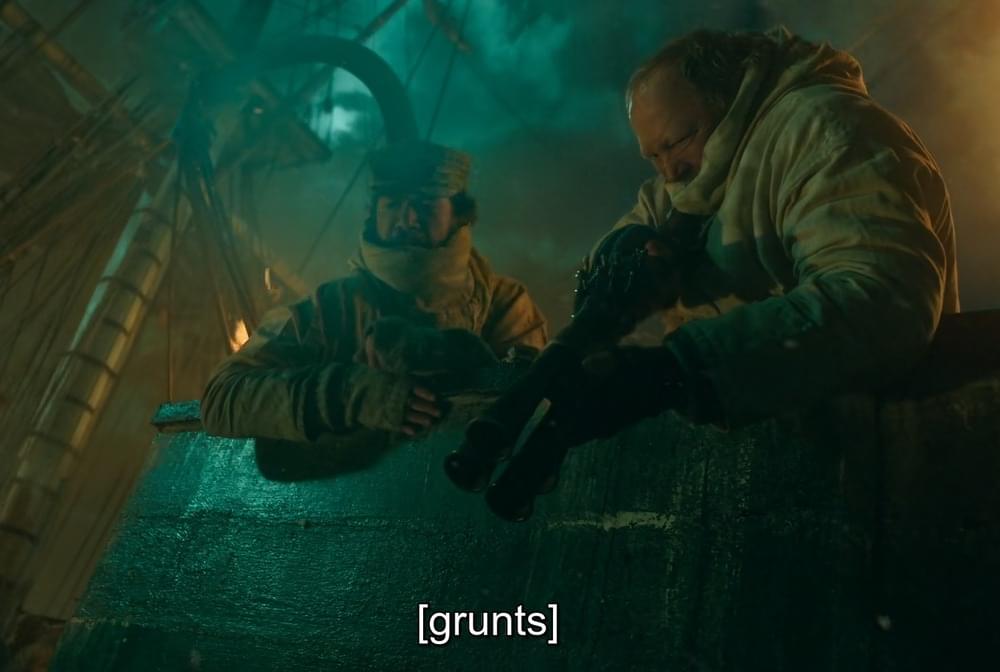
- Sound effects - descriptions like [door slams], [phone ringing], or [shatters]
- Music cues - notes like [suspenseful music plays] or [upbeat jazz]
- Non-speech audio - any other cue vital to understand the scene, such as [crowd cheering] or [heavy breathing]
Keep in mind that closed captions operate on the assumption that viewers cannot hear anything at all. As a result, a well-created closed caption has all the meaningful sounds represented in simple text and now just the words that people are saying.
A brief history of closed captioning
The origins of closed captioning can be traced back to the early 1980s, when the Federal Communications Commission (FCC) in the United States mandated that broadcast television include captions for deaf and hard-of-hearing viewers. The CC requirement started with major networks and expanded over the decades.
By the mid-1990s, the Telecommunications Act of 1996 made it compulsory for all new television programming to include closed captions. The evolution of media and the importance of accessibility have now made closed captions to be a standard across streaming platforms, social media, and digital content.
Even though closed captions started out as a legal requirement, they are not a feature that hundreds of millions of people use every day.
How do closed captions work?
Understanding what closed captioning is becomes easier by looking at how it all works behind the scenes. There are three main steps involved in the working of closed captions:
Step 1: Transcription
The audio content of the video is transcribed into text. This transcription includes all dialogue, sound effects, and non-speech elements. Transcription can be done manually by a professional captioner or automatically using an AI-powered transcription tool.
Step 2: Time-syncing
The transcribed text is broken into small chunks called “caption frames.” Each frame is assigned a specific timecode that tells the video player exactly when to display that piece of text and when to remove it. This synchronization is what separates captions from a plain transcript.
Step 3: Delivery as a caption file
The time-synced text is saved as a caption file that the video player reads. The following are the most common caption file formats:
- SRT (SubRip Subtitle): This is the most widely used caption file format. Every major video platform, like YouTube and Facebook, supports the SRT file.
- VTT (WebVTT): A VTT file is commonly used for HTML5 web video players.
- SCC: This closed caption file is mainly used in broadcast television and iOS media
So, when you press the CC button on a video player, it reads the separate caption file and overlays the text onto the video in real time. In other words, the caption file is not part of the video itself. It is an independent layer, which is why you can turn CC on and off.
Related: How to Create an SRT File for Video Subtitles Easily?
Auto-generated vs professional captions
It is important to note that there’s a significant difference between the auto-generated and professional closed captions. Platforms like YouTube automatically generate captions using speech recognition AI. While convenient, auto-generated captions are often inaccurate, especially with accents, technical terms, or multiple speakers.
This is why professional captions created by human captioners or high-accuracy AI tools are significantly more reliable, especially if you want the captions to be accurate for your content.
Closed captions vs subtitles: Are they the same thing?
One of the most commonly asked questions about captions is: does closed caption mean subtitles? The short answer is no, especially not in the United States.
Closed captions are meant for viewers who are deaf or hard of hearing. They include everything, including dialogue, sound effects, speaker identifications, and music cues. CC operates on the assumption that viewers cannot hear any audio at all.
Subtitles, on the other hand, are for viewers who can hear the audio but do not understand the language being spoken. Hence, subtitles translate spoken dialogue into another language and typically do not include sound effects or speaker labels.
The following table summarizes the differences between closed captions and subtitles:
| Feature | Closed Captions | Subtitles |
|---|---|---|
| Purpose | Accessibility for hard of hearing | Language translation |
| Audience | Viewers who cannot hear audio | Viewers who cannot understand the language |
| Dialogue | Yes | Yes |
| Sound Effects | Yes ([door slams], etc.) | No |
| Speaker IDs | Yes ([John], [Narrator]) | No |
| Music Cues | Yes ([suspenseful music]) | No |
| Can be Toggled | Yes | Yes |
Despite the differences, remember that the terms “captions” and “subtitles” are often used interchangeably outside of the United States.
In the UK and many other countries, what Americans call closed captions are simply referred to as “subtitles.” Even some global platforms like Netflix may label the same feature differently depending on your region.
Read more: Closed captioning vs subtitles
Closed captions vs open captions
Another term you might have heard is “open captions.” The main difference between closed and open captions comes down to one key thing: control.
You can turn on or off the closed captions at any type. These captions exist as a separate text layer that the video player reads and displays on activation. CC is the standard for majority of streaming platforms, broadcast TV, and online videos.
On the other hand, open captions are permanently burned into the video itself.
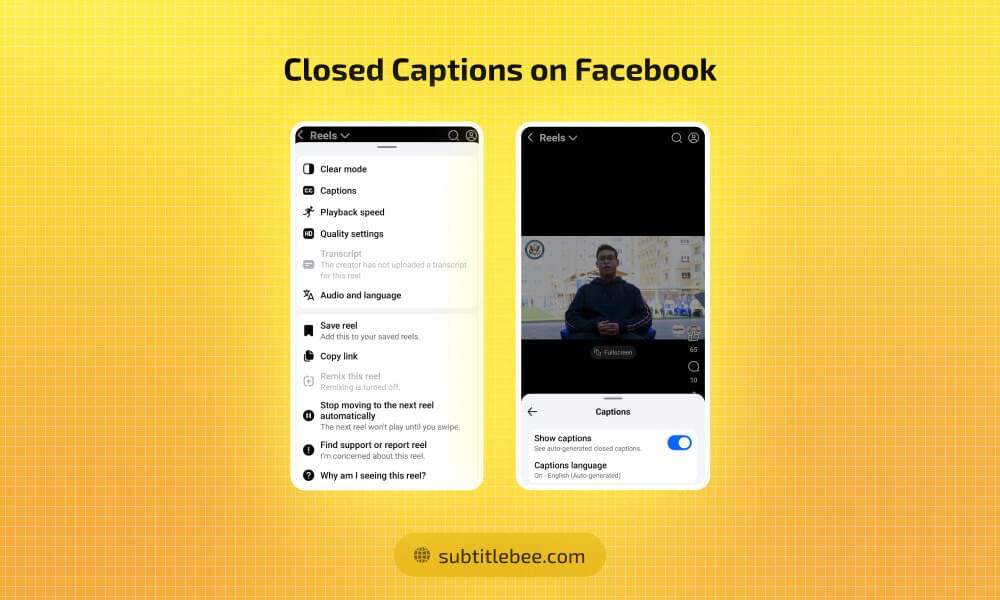
They are always visible and cannot be turned off. You will see open captions on social media videos like Instagram Reels, TikTok, and YouTube Shorts. Facebook.
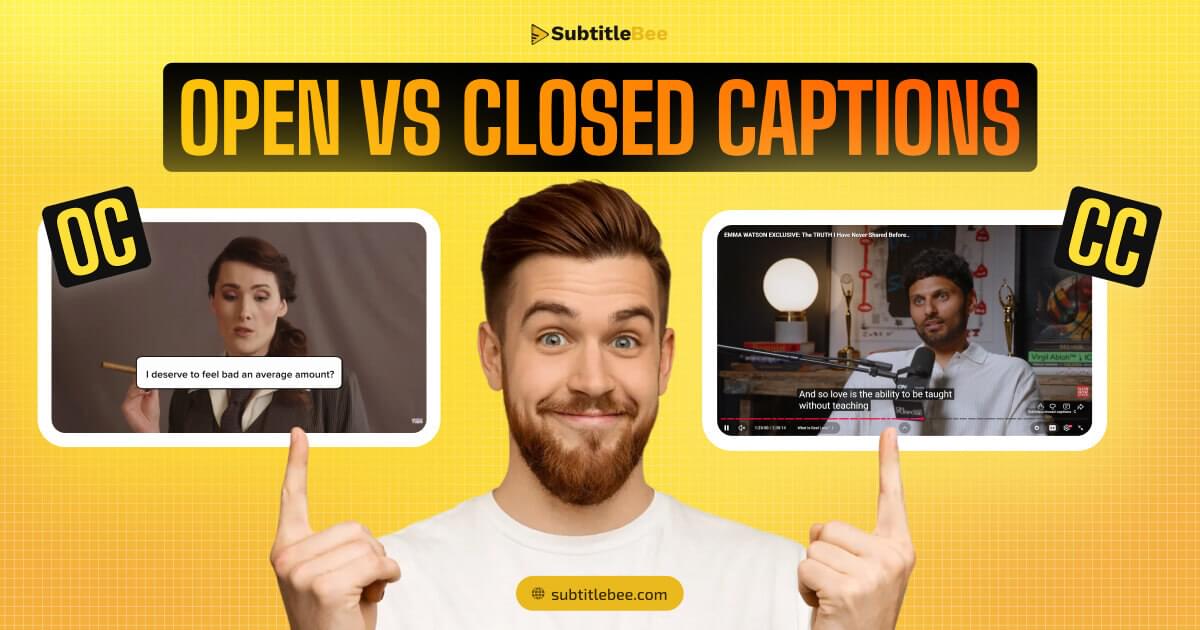
Both of these types of captions, open and closed, have their own pros and cons. Closed captions provide maximum flexibility to viewers, while open captions always ensures that the text is visible to all viewers no matter what their device settings are.
On social media especially, most content creators use open captions to capture the users’ attention who often scroll through their feeds with the sound off.
Many content creators use open captions on social media specifically because most users scroll through their feeds with the sound off.
Read more: Understanding the difference between subtitles and captions
What does CC mean in movies and streaming?
If you have ever noticed the CC label on Netflix, YouTube, or Disney+, you might have wondered what does CC mean in movies and streaming content. It simply means that closed captions are available for that title. Tapping or clicking the CC button enables the caption text overlay.
Here is how to turn on closed captions on the most popular streaming platforms:
Netflix
Click or tap the dialogue icon (speech bubble) while a title is playing. Select the captions or subtitles track you prefer. Netflix labels closed captions with a [CC] tag next to the language name to distinguish them from standard subtitle tracks.
YouTube
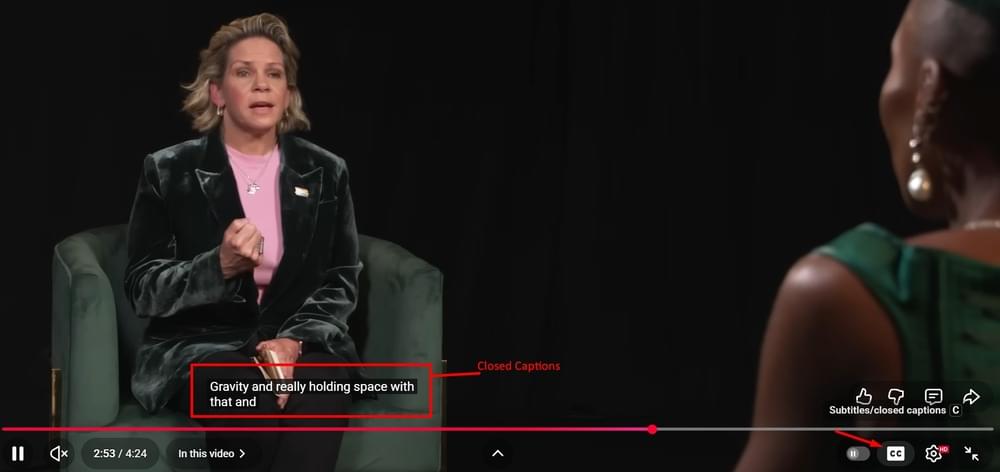
Click the CC button at the bottom of the video player. If the button is available, the video has captions — either uploaded by the creator or auto-generated by YouTube. You can access more options in Settings > Subtitles/CC to choose a specific language or turn on auto-translate.
Disney+
Tap the audio and subtitles icon while watching. Choose from the available caption tracks. Disney+ typically offers both standard subtitles and closed captioning options labeled with [CC].
Amazon Prime Video
Select the speech bubble icon during playback. Choose from the available subtitle and caption tracks. Closed caption tracks are labeled accordingly and include full audio descriptions.
Apple TV+
Go to Settings > Accessibility > Subtitles & Captioning on your Apple device. You can also toggle captions on and off during playback from the player controls. Apple TV+ offers SDH (Subtitles for the Deaf and Hard of Hearing) tracks, which function similarly to closed captions.
Regardless of the platform, the CC symbol always means the same thing: a text track is available that you can turn on or off at will.
What does closed caption mean at AMC and other movie theaters?
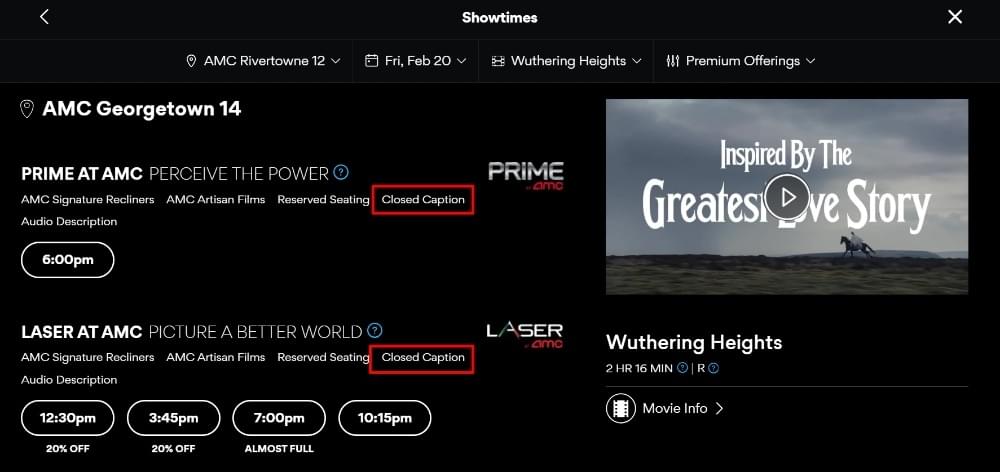
What does closed caption mean when you see it listed for a showtime at AMC, Regal, or Cinemark?
In a movie theater, closed captions work differently than they do on your TV or phone. You cannot simply press a button on the screen. Instead, theaters provide special devices that display captions only to the viewers who request them.
Here’s an example of a movie’s showtime at AMC showing availability of closed captioning:
Why movie theaters offer closed captions
Not every moviegoer can follow dialogue by ear alone. People who are deaf or hard of hearing need captions to enjoy the film. Non-native speakers may also benefit from reading the dialogue as they listen.
Under the Americans with Disabilities Act (ADA), movie theaters are required to provide closed captioning equipment upon request.
Types of closed captioning devices in theaters
There are three common devices you will find at major theater chains:
Mirror captions
A small reflective mirror is placed in the armrest cup holder. Captions are projected onto the back wall of the theater in reverse, and the mirror reflects them so they appear correctly to the viewer.
This works but requires some adjustment to angle the mirror properly, and constantly looking down at the mirror and up at the screen can be tiring.
Closed captioning smart glasses
These are wide, tinted glasses that display caption text directly on the lower portion of the lenses. The glasses connect by wire to a small receiver box worn around the neck. The benefit is that captions appear in your line of sight, so you do not need to look away from the screen.
Caption stands (CaptiView)
A flexible gooseneck pole attaches to the cup holder with a small LED screen at the top. You position the screen near your line of sight so you can glance at captions without turning your head. This is generally considered the most comfortable option among the three.
However, caption stands can have a slight delay between on-screen dialogue and the displayed text, and they occasionally experience technical glitches.
How to request closed captioning at a theater?
At AMC, Regal, Cinemark, and most major chains, simply ask at the front desk or guest services counter before your showtime. Let them know you need a closed captioning device, and they will provide one. Some theaters also allow you to request devices through their mobile apps when booking tickets.
Open caption screenings
A growing number of theaters now offer open caption screenings for select showtimes. During these screenings, captions are displayed directly on the movie screen for everyone, without any device needed.
AMC, for example, has expanded its open caption showings in response to audience demand. Check your local theater’s schedule to see if open caption screenings are available.
Who uses closed captions and why?
The original purpose of closed captioning was an accessibility feature for deaf and hard of hearing viewers. That remains its primary purpose and one of the most important reasons captions exist.
However, studies consistently show that the majority of people who regularly use closed captions do not have hearing loss. So who else is using them, and why?
Non-native language speakers
Watching content with closed captions in the spoken language makes it significantly easier to follow dialogue, catch unfamiliar words, and understand accents. This is why captions have become one of the most popular tools for language learners around the world.
People in sound-sensitive environments
If you have ever watched a video at the gym, on the train, in a waiting room, or at your desk during work, you have probably relied on captions. Closed captions let you consume content fully without needing headphones or speakers.
Parents with sleeping children
This is one of the most relatable use cases of closed captions. Many parents around the world keep the volume low or off while reading captions to minimize any disruptions to their sleeping children.
Viewers wanting better comprehension
Reading and hearing the same content simultaneously can help with focus, retention, and understanding. It is especially useful for fast-paced dialogue. This is why many students and educators prefer captioned content.
People dealing with poor audio quality
Bad audio mixing, heavy accents, and loud background music are all common in different movies and TV shows. Closed captions eliminate these issues and help the viewers understand the complete content.
The bottom line is that closed captioning has grown far beyond its original accessibility purpose. It is now a mainstream viewing method used used by hundreds of millions of people worldwide.
Also read: Why is everyone using subtitles?
How to add closed captions to your videos?
If you create video content for YouTube, social media, your website, or any other platform, you should consider adding closed captions to improve accessibility, boost engagement, help with SEO, and make your videos watchable in any environment.
Following are the main three methods you can explore to add closed captions (CC):
Method 1: Manual captioning
You write the captions yourself, add timecodes manually, and save the file in a supported format like SRT or VTT. This gives you full control over accuracy but is extremely time-consuming and outdated method. Even a single minute of video can take anywhere between 5 to 10 minutes to caption manually.
Method 2: Platform auto-captions
Platforms like YouTube, TikTok, and Instagram now offer auto-generated captions powered by speech recognition.
These are free tools, but accuracy is inconsistent. Auto-captions frequently struggle with names, technical terms, accents, and overlapping speakers. So, if you are using the auto-caption method of platforms, you need to carefully always review and correct the generated text.
Method 3: AI subtitling and captioning tools
AI-powered captioning tools offer the best balance of speed and accuracy. You upload your video, and the tool generates time-synced captions automatically within minutes and with much higher accuracy than platform auto-captions.
SubtitleBee, for example, can generate closed captions with 99% accuracy and supports translation into 120+ languages. It is a fast, reliable option for creators who want professional captions without the manual effort.
Also read: How to automatically generate video subtitles?
Closed captions vs transcripts
You might have also come across the term “transcript” alongside closed captions. They are slightly related, but have varying purposes:
- A transcript is a plain text document. It contains the full written content of a video or audio file. It is not synchronized with the media in any way, so you can read it separately just like reading an article version of a podcast episode.
- Closed captions, by contrast, are time-synced to the video. Every single line appears and disappears at the exact moment it corresponds to in the audio. Hence, captions are essential for video content where visual context and timing matter.
When should you use which?
If your content is audio-only (like a podcast), a transcript is enough. If your content is video, you need closed captions for better accessibility.
In many cases, you can consider offering both to strike a balance. Captions are overall better for the viewing experience and a transcript is better for SEO, searchability, and readers who prefer text.
Also read: 10 powerful benefits of transcribing audio to text
Conclusion
The bottom line is that closed captions are a highly powerful tool to enhance the accessibility and engagement of any video. Whether it’s a short 30-sec clip on a social media platform or a full-feature film in cinema, closed captioning can enhance the viewing experience by giving users the ability to enable or disable captions, which many people might also call subtitles.
So, if you are a content creator yourself or maybe just want to experiment with closed captions
Frequently asked questions
Does closed caption mean subtitles?
Not exactly. Closed captions are for viewers who cannot hear the audio and include dialogue, sound effects, music cues, and speaker labels. On the other hand, subtitles are for viewers who can hear but need a translation of the spoken language. In practice, especially outside the US, the terms closed captions and subtitles are often used interchangeably.
What does the CC button do?
The CC button on a video player toggles closed captions on or off. When you enable it, the video player displays a text overlay that includes dialogue and other audio descriptions. You can disable it at any time to remove the text.
What does CC mean on Netflix?
On Netflix, CC stands for closed captions. When you see [CC] next to a language option in the subtitle menu, it means that track includes not just dialogue but also sound effects, music descriptions, and speaker labels.
Can you get closed captions at AMC?
Yes. AMC theaters provide closed captioning devices free of charge. Ask at the front desk before your movie and they will provide a device, which is typically a CaptiView caption stand or smart glasses.
What is the difference between closed and open captions?
Closed captions can be toggled on or off by the viewer. Open captions are permanently embedded in the video and you cannot turn them off. Overall, closed captions are the standard for streaming and broadcast, while open captions are common on social media videos.
Are closed captions always in English?
No. Closed captions are available in many languages, depending on the content and the platform.
How do I add closed captions to my videos?
The most reliable and quickest way to add closed captions to your videos is through an AI-powered captioning tool like SubtitleBee. It can generate accurate and time-synced captions in minutes. Moreover, you can get the transcript file in SRT, VTT, ASS, or TXT file format with perfect sync.



Add and translate your subtitles to more than 100 languages with high accuracy
Our solution
SubtitleBee
Make your video understandable by using SubtitleBee for free
Start now for freeTop Articles

Getting Started with AI-Powered SubtitleBee

3 Effective Ways To Add Subtitles To Video Online Without Watermark
VEED vs. Kapwing: Which Subtitle Generator wins?
Kapwing vs. SubtitleBee: Which subtitling tool should you choose?

5 Top Verbit Alternatives for Transcription