



video tutorials for social media
SRT vs VTT: Differences and Which Subtitle Format to Use
SRT and VTT are the two subtitle formats you will run into most, and at first glance they look almost identical: plain text, a timestamp, a line of dialogue. The differences are small, but they decide whether your captions show up on a website player, keep their position on screen, or get rejected by an upload form. This guide compares SRT vs VTT line by line, shows which platforms want which file, and covers the other formats you might be asked for.
The Short Answer
Use SRT when you are uploading captions to a social platform or importing them into a video editor. It is the format almost everything accepts.
Use VTT (WebVTT) when the captions will play in a web browser through your own site, an HTML5 player or a learning platform, or when you need captions to sit in a specific position on screen.
If you are not sure, keep both. They hold the same text and timing, so exporting both from the same subtitle project costs you nothing.
What Is an SRT File?
SRT stands for SubRip Subtitle. The name comes from SubRip, a Windows program that pulled subtitles off DVDs into plain text files. The format outlived the program because it is about as simple as a subtitle file can be.
Each caption in an SRT file is a block of four parts:
- A sequence number (1, 2, 3…)
- A timecode line, start and end, in
hours:minutes:seconds,milliseconds - One or two lines of caption text
- A blank line that ends the block
1 | 1 |
That is the whole format. There is no header, no official styling, and no way to say where the text should appear. Some players read basic tags such as <i> and <b>, but support is uneven, and YouTube’s help page says it recognizes only basic SRT files with no style markup.
For a deeper look at the format, see our guide What is an SRT file.
What Is a VTT File?
VTT stands for Web Video Text Tracks, usually written WebVTT. It was designed for the web: it is the caption format HTML5 video players read through the <track> element, and it is maintained as a W3C specification.
A VTT file starts with the word WEBVTT on the first line, and then lists cues that look a lot like SRT blocks:
1 | WEBVTT |
Look at the second cue. The text after the timecode tells the player to show that caption near the top of the frame. SRT has no way to do that. VTT also allows comments (NOTE), CSS-based styling, named regions and metadata cues, all of which are optional.
Our guide What is a VTT file walks through each part of the format in more detail.
SRT vs VTT: The Differences, Side by Side
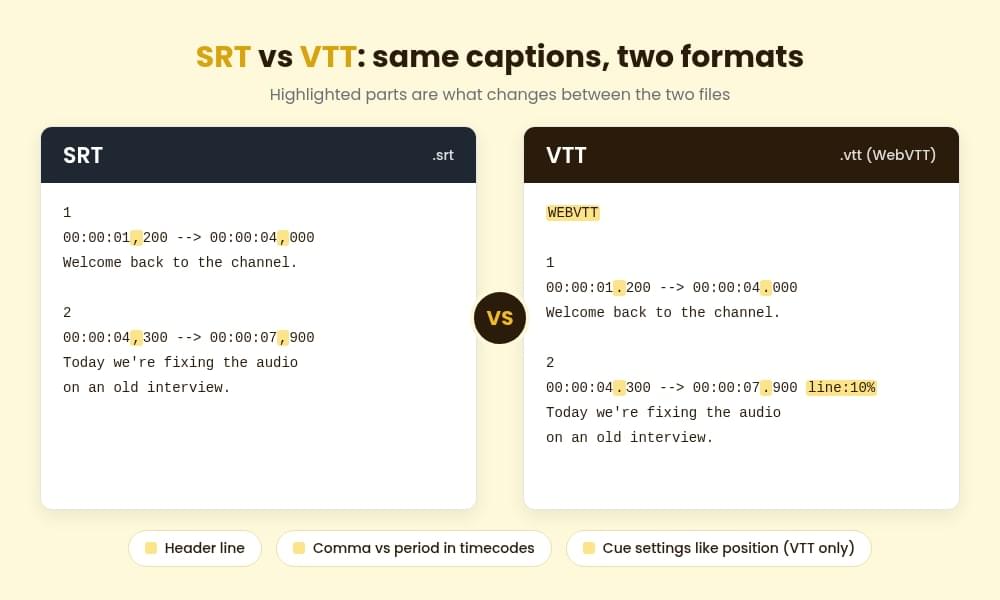
| SRT | VTT (WebVTT) | |
|---|---|---|
| Full name | SubRip Subtitle | Web Video Text Tracks |
| File header | None | Must start with WEBVTT |
| Cue numbers | Required | Optional (any text label works) |
| Timestamp separator | Comma: 00:00:01,200 | Period: 00:00:01.200 |
| Hours in timestamp | Always written | Optional (01:01.200 is valid) |
| Positioning | Not supported | Line, position, size and alignment per cue |
| Styling | Unofficial basic tags, often ignored | Bold, italic, underline, CSS via ::cue |
| Comments and metadata | No | NOTE blocks and metadata cues |
| Text encoding | Not defined, UTF-8 is safest | UTF-8 required |
| Native browser playback | No | Yes, through HTML5 <track> |
| Best for | Uploads to social platforms and editors | Websites, HTML5 players, streaming |
Three of these rows cause most real-world problems.
The Timestamp Comma
SRT uses a comma before the milliseconds. VTT uses a period. If you rename an .srt file to .vtt without changing anything else, a browser will refuse to load it, partly because the header is missing and partly because every timestamp is wrong. This is the most common reason a “converted” VTT file shows no captions.
Positioning
When text is burned into the bottom of your footage, such as a lower-third name card, bottom-aligned captions sit right on top of it. VTT lets you move individual cues up the frame. With SRT, the player decides, and it almost always puts captions at the bottom.
Encoding
SRT never defined a character encoding, so older files are sometimes saved in a regional encoding and turn accented letters into gibberish on upload. VTT requires UTF-8. If you work in languages with accents or non-Latin scripts, save SRT files as UTF-8 too.
Which Format Does Each Platform Accept?
Most upload forms take SRT. Browser-based players lean towards VTT. Here is where the common destinations stand:
- YouTube: accepts both. Its help page recommends basic formats such as SRT for beginners and ignores styling inside SRT files. Our guide to adding subtitles to YouTube videos covers the upload steps.
- Facebook: SRT, with the language in the filename, for example
video.en_US.srt. See how to add captions to Facebook videos. - LinkedIn: SRT.
- Vimeo: accepts both SRT and VTT, along with several broadcast formats.
- Your own website (HTML5 video): VTT only. Browsers do not play SRT through the
<track>element. - Learning platforms and web players: most use VTT under the hood. Many accept an SRT upload and convert it, but VTT avoids the conversion step.
- Premiere Pro and most desktop editors: SRT is the safe import. Our Premiere Pro subtitles guide shows the import step.
- Instagram and TikTok: neither has a caption-file upload in the regular posting flow. Burn the captions into the video instead (more on that below).
Platforms change their upload options from time to time, so check the platform’s help page if an upload fails.
Other Subtitle Formats You Might Meet
SRT and VTT cover most jobs, but a client brief or a platform spec sheet may ask for something else.
| Format | Extension | What it is | When you’d use it |
|---|---|---|---|
| Advanced SubStation Alpha | .ass | Subtitles with fonts, colors, outlines, exact positioning and karaoke effects | Styled subtitles for desktop players such as VLC and mpv, fan subtitling, anime |
| SubViewer | .sbv | A simple text format YouTube used to export | Older YouTube caption files |
| TTML / DFXP | .ttml, .dfxp, .xml | XML-based timed text with styling and layout | Streaming services, broadcast delivery specs |
| Scenarist Closed Captions | .scc | The broadcast closed caption format for North American TV | TV delivery, some ad networks |
| Plain transcript | .txt | The words with no timing | Show notes, blog posts, translation review |
A TXT file is not a subtitle file, but it is often what people actually need when they ask for “the captions.” If you want the words for an article or a podcast page, a transcript is the right file. Our audio transcription tool produces one directly.
How to Convert SRT to VTT (and Back)
Because the two formats are so close, you can convert a short file by hand in any text editor.
SRT to VTT
- Open the
.srtfile in a plain text editor. - Add
WEBVTTas the very first line, followed by a blank line. - Replace the comma in every timestamp with a period (
00:00:01,200becomes00:00:01.200). Use find and replace on,only inside the timecode lines, or you’ll change commas in your dialogue too. - Leave the sequence numbers. VTT treats them as cue labels.
- Remove
<font>tags if there are any. VTT does not support them. - Save as UTF-8 with a
.vttextension.
VTT to SRT
- Delete the
WEBVTTheader line and anyNOTE,STYLEorREGIONblocks. - Delete any cue settings after the timecodes, such as
line:10% align:center. - Add hours to any short timestamp (
01:01.200becomes00:01:01.200). - Replace the period in each timestamp with a comma.
- Make sure every cue has a sequence number, starting at 1.
- Save with a
.srtextension.
For anything longer than a few minutes, hand conversion is slow and easy to get wrong. It is faster to export the format you need from the tool that made the subtitles in the first place.
Sidecar File or Burned-In Captions?
SRT and VTT are both sidecar files: separate files that play alongside the video, which viewers can usually switch on or off. That makes them good for accessibility, for search engines that read caption text, and for offering several languages on one video.
The alternative is to burn captions into the video frame so they are always visible. That is the only option on platforms with no caption upload, and it guarantees your styling looks the same everywhere. The trade-off is that viewers cannot turn the captions off and you need a separate export per language. Our guide to hardcoded subtitles explains when each approach makes sense.
How to Get SRT and VTT Files From One Project
Writing timecodes by hand is fine for a 30-second clip. For anything longer, generate the subtitles automatically and fix them, rather than typing them.
In SubtitleBee you upload the video, choose the spoken language, and the AI transcribes it into timed subtitles. Transcription works in 60+ languages, and accuracy can reach up to 95% on clear audio, so plan a quick proofread before you export.
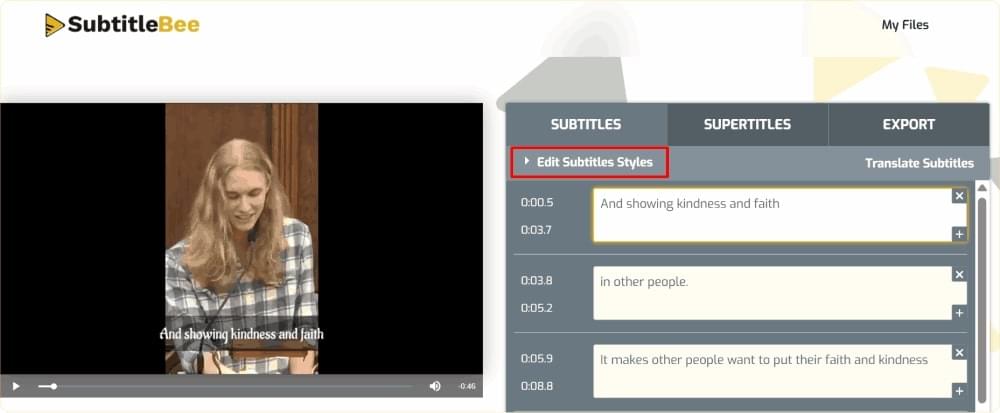
When the text and timing look right, open the export options and pick the file you need:
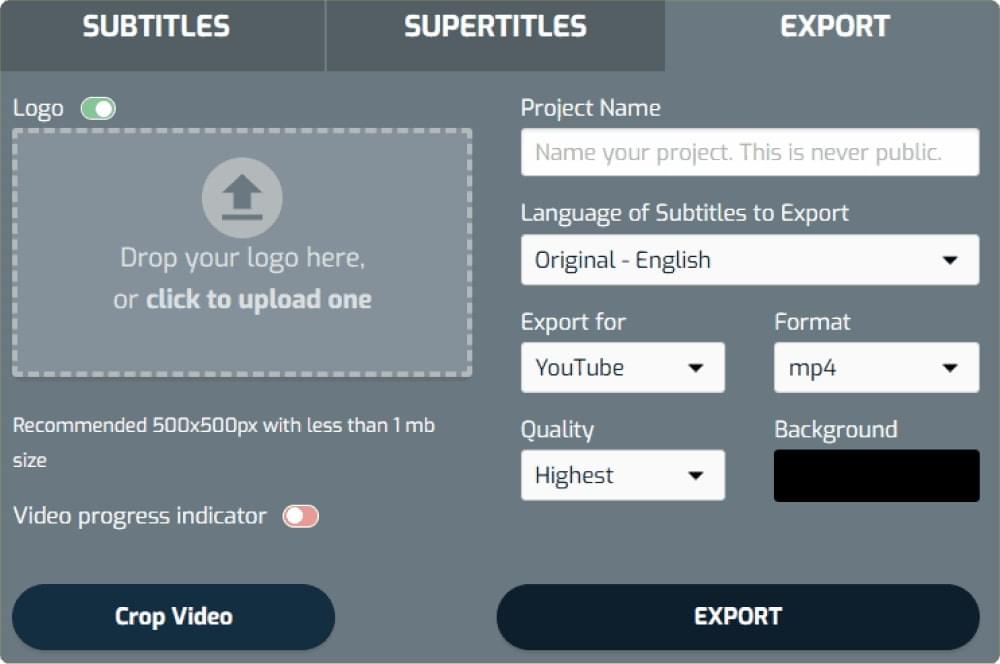
- SRT and TXT downloads are available from the Starter plan.
- VTT and ASS downloads are available on the Premium and Business plans.
- On the free plan you can generate and edit subtitles, but subtitle file downloads are not included, and video exports carry a watermark.
You can also translate your subtitles into 100+ languages and export each language as its own file, which is handy for YouTube and Vimeo, where you can attach several caption tracks to one video. Plan details are on the pricing page.
If you’d rather build files manually, we have step-by-step guides for creating an SRT file and creating a VTT file.
Frequently Asked Questions
Is VTT Better Than SRT?
Neither is better overall. VTT can do more (positioning, styling, comments, metadata) and is the format browsers play natively. SRT is simpler and more widely accepted by upload forms and video editors. Pick based on where the file is going.
Can I Convert SRT to VTT?
Yes. Add a WEBVTT header line, change the comma in every timestamp to a period, and save the file as UTF-8 with a .vtt extension. The steps are listed in the conversion section above. Going from VTT to SRT means removing the header, comments and cue settings, and switching periods back to commas.
Does YouTube Use SRT or VTT?
YouTube accepts both, along with several other formats. SRT is the simplest choice for most creators. YouTube ignores styling inside SRT files, so do not rely on SRT tags for colors or bold text there.
What Is an SRT or VTT File?
Both are plain text files that store caption text with start and end times, so a video player can show each line at the right moment. SRT is the older, simpler format from desktop video. VTT is the web format, built for HTML5 video players.
Can I Just Rename an .srt File to .vtt?
No. A VTT file needs the WEBVTT header and periods instead of commas in its timestamps. A renamed SRT file usually fails to load in a browser player with no error message, so the captions simply do not appear.
Which Subtitle Format Is Best for Social Media?
SRT, for the platforms that accept caption uploads, such as YouTube, Facebook and LinkedIn. For Instagram Reels and TikTok, burn the captions into the video, because neither offers a caption-file upload in the normal posting flow.
Export the Format You Need, Not the One You Have
Most of the time you will want SRT for uploads and VTT for the web, and the easiest way to have both is to keep one subtitle project and export from it. Create a free SubtitleBee account to generate and proofread your subtitles, then download the format each platform asks for.


Add and translate your subtitles to more than 100 languages with high accuracy
Our solution
SubtitleBee
Make your video understandable by using SubtitleBee for free
Start now for freeTop Articles

Getting Started with AI-Powered SubtitleBee

3 Effective Ways To Add Subtitles To Video Online Without Watermark

VEED vs. Kapwing: Which Subtitle Generator wins?

Kapwing vs. SubtitleBee: Which subtitling tool should you choose?

5 Top Verbit Alternatives for Transcription