



video tutorials for social media
Black Friday Video Marketing: 10 Ideas to Promote Your Sale
The best Black Friday video marketing ideas are short and simple: a teaser before the sale, a clip that states the offer in the first seconds, a quick product demo, customer reviews, a gift guide and a last-chance reminder. Make each one in vertical format, put the offer on screen and add captions, because most people scroll their feeds with the sound off.
Black Friday is the loudest week of the year for brands. Every feed is full of sales, and most of them look the same: a product photo, a percentage and a “shop now” button. Video gives you more room to stand out. You can show the product in use, put a face to your brand and explain the offer in a few seconds.
You do not need a production team for this. A phone, good light and a clear script go a long way. This guide gives you ten Black Friday video ideas, a simple posting calendar for 2026, the right sizes for each platform and the steps to make your videos readable without sound.
Black Friday 2026 falls on Friday, November 27, the day after Thanksgiving in the US, and Cyber Monday is November 30. Plan your videos backwards from those dates.
Shopping for tools yourself? Check out the best Black Friday SaaS deals of 2026 in our list of 30+ Black Friday and Cyber Monday Software Deals of 2026.
10 Black Friday Video Marketing Ideas
1. Tease the Sale Before It Starts
Start one to two weeks early with a short teaser. Do not give away the full offer yet. Show a glimpse of what is coming, the date the sale starts, and ask people to follow you or join your email list so they hear first.
A teaser works best when it is short (around 10 seconds), uses the same look as the sale videos that follow, and ends with one clear action. A countdown series (“5 days to go”, “3 days to go”) keeps the sale in people’s feeds without repeating the same post.
2. Put the Offer in the First Two Seconds
Most people decide whether to keep watching almost immediately. Your Black Friday ad should not open with a logo animation. Open with the offer itself, written large on screen: “30% off everything”, “Buy one, get one free”, “Free shipping this weekend”.
Then use the rest of the clip to show what they get. Keep the text on screen for long enough to read, and say it out loud as well, so it works for people watching with and without sound.
3. Make a 30-Second Product Demo
A product demo answers the question every shopper has: “What does this actually do for me?” Show the product in use from start to finish, in real conditions, not as a set of beauty shots.
For a physical product, that could be unpacking it and using it for the first time. For software, record your screen and show one task being done quickly. Keep it to one main benefit per video. If you have three best sellers, make three short demos instead of one long one. Our guide on how to make an effective product demo video covers how to script one.
4. Turn Your Gift Guide Into a Video
Many Black Friday shoppers are buying for someone else. A gift guide video (“5 gifts under $50”, “gifts for coffee lovers”, “what to buy a new parent”) helps them decide and puts several of your products in front of them at once.
Show each product for a few seconds, name it on screen with its sale price, and keep the pace quick. A gift guide is also easy to cut into a series: one video per budget or per type of person.
5. Share Real Customer Reviews
Shoppers trust other customers more than they trust your ad. Short clips of real customers talking about your product, or their unboxing videos, make good Black Friday content because they answer doubts before the buyer has them.
Ask your happiest customers for a short clip, or ask permission to reshare videos they have already posted. Put a short quote from the review on screen so the point lands even when the video is muted.
6. Show the Behind the Scenes
Packing orders, preparing stock, the team getting ready for the busy weekend: behind-the-scenes videos make a small business feel personal next to the big retailers. They also give you something new to post during the sale that is not another discount announcement.
Unboxing and packing videos are especially popular on TikTok and Reels. If you film them, our guide to unboxing video subtitles explains how to keep them easy to follow.
7. Explain How to Claim the Deal
If your offer needs a discount code, a minimum spend or a specific plan, some buyers will get stuck at checkout. A 20-second “how to claim the deal” video removes that friction: show where to enter the code, which products are included and when the offer ends.
This is one of the most useful videos you can make, and one of the least common. Pin it to your profile and link it from your sale emails.
8. Go Live, Then Clip the Best Moments
A live stream on TikTok, Instagram or YouTube lets you show products, answer questions in real time and announce limited offers to the people watching. It is the closest thing to a shop floor on social media.
Do not let the live session disappear after it ends. Cut the best questions, demos and reactions into short clips and post them over the following days. One hour of live video can give you a week of short posts.
9. Reach Shoppers in Other Languages
Black Friday is no longer only a US event. Retailers across Europe, Latin America and other regions run Black Friday sales, so the same offer can reach buyers in other countries if they can understand it.
You do not need to film the video again. Add subtitles in the original language, then translate them. With SubtitleBee you can translate subtitles into 100+ languages from the same upload and export one version per market. Have a native speaker check the translated offer before you post it, especially prices, dates and conditions.
10. Send a Last-Chance Reminder
The last day of a sale often brings a final rush of orders, because people who meant to buy finally act. Post a short reminder on the last day of Black Friday and again for Cyber Monday: what the offer is, that it ends tonight, and where to buy.
Reuse footage from your earlier videos and change the text on screen. A last-chance video does not need new filming, it needs a clear deadline.
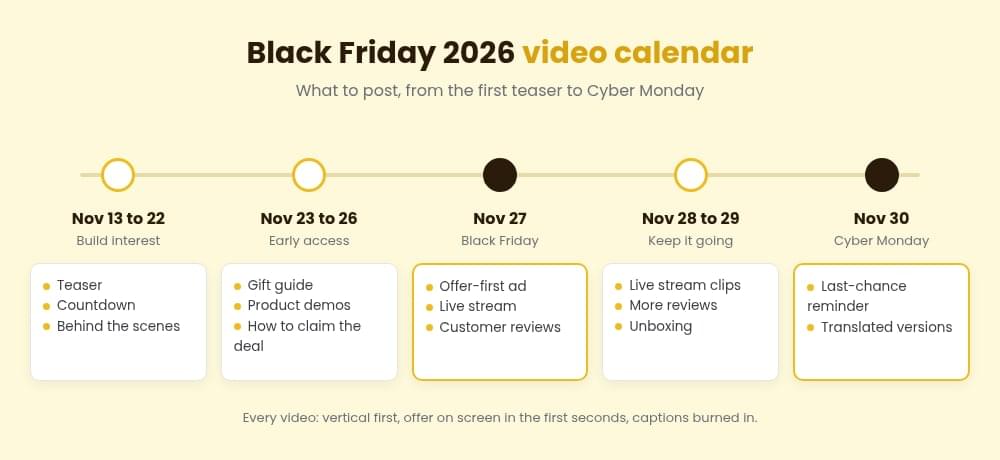
A Simple Black Friday 2026 Video Calendar
| When | What to post | Video ideas |
|---|---|---|
| Nov 13 to 22 | Build interest | Teaser, countdown, behind the scenes |
| Nov 23 to 26 | Early access and gift ideas | Gift guide, product demos, how to claim the deal |
| Nov 27 (Black Friday) | The sale is live | Offer-first ad, live stream, customer reviews |
| Nov 28 to 29 | Keep it going | Clips from the live stream, more reviews, unboxing |
| Nov 30 (Cyber Monday) | Last chance | Last-chance reminder, translated versions for other markets |
Adjust the dates to your own sale. If your offer runs for longer, stretch the middle part and keep the last-chance video for the final day.
Use the Right Size for Each Platform
One video can serve every platform if you plan the frame. Film in vertical format and keep the important part of the image in the center, so you can crop it for square and landscape versions later.
| Platform | Format | Aspect ratio |
|---|---|---|
| TikTok, Instagram Reels, YouTube Shorts, Stories | Vertical | 9:16 (1080 x 1920) |
| Instagram and Facebook feed | Portrait or square | 4:5 or 1:1 |
| YouTube, website, email landing pages | Landscape | 16:9 |
For the details per platform, see our guides to TikTok video size, Instagram video size and YouTube Shorts dimensions. SubtitleBee can also resize your video when you export it, so you do not need a separate tool for each version.
Make Every Video Work With the Sound Off
Social feeds often start videos muted, and many people keep them that way on the bus, at work or late at night. If your Black Friday video depends on the voice-over, a muted viewer misses the offer. Three things fix that:
- Captions for everything that is said. Burn them into the video so they show on every platform, even where viewers cannot turn captions on. Our guide to hardcoded vs soft subtitles explains the difference.
- The offer as text on screen. Write the discount, the end date and the action as a separate text overlay, not only inside the captions. SubtitleBee’s add text to video tool lets you add these as extra lines with their own timing and style.
- Your logo on every clip. Videos get reshared and screenshotted. A small logo in a corner keeps your brand attached to the offer. See how to add a logo to a video.
Keep the captions and the offer text clear of the app buttons. On TikTok and Reels, the right side and the bottom of the screen are covered by icons and the post text, so place text in the lower third but above that area.
How to Add Captions to Your Black Friday Videos
- Upload your video to SubtitleBee, or paste a link to it.
- Choose the language spoken in the video. SubtitleBee creates subtitles automatically in 60+ languages.
- Proofread the subtitles. Check product names, prices and dates line by line. One wrong number in a sale video costs more than a typo.
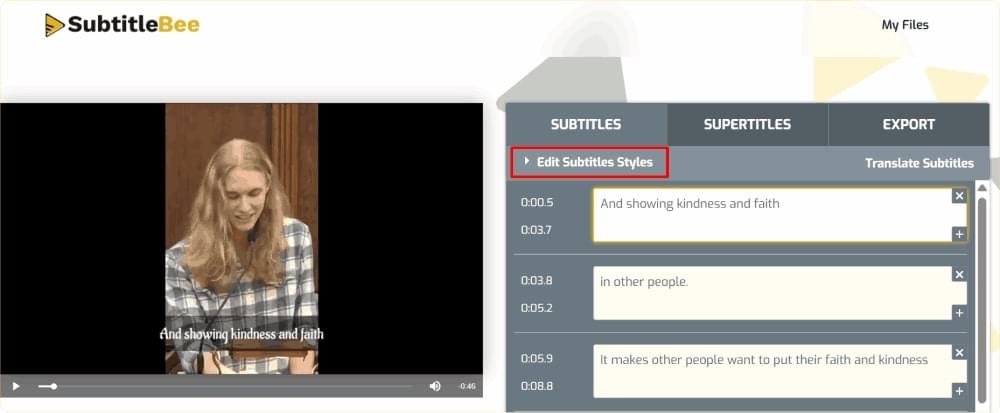
- Style them to match your brand. Pick a bold, readable font, your brand colors and a background box so the text stands out on busy footage. Our list of the best subtitle fonts can help.
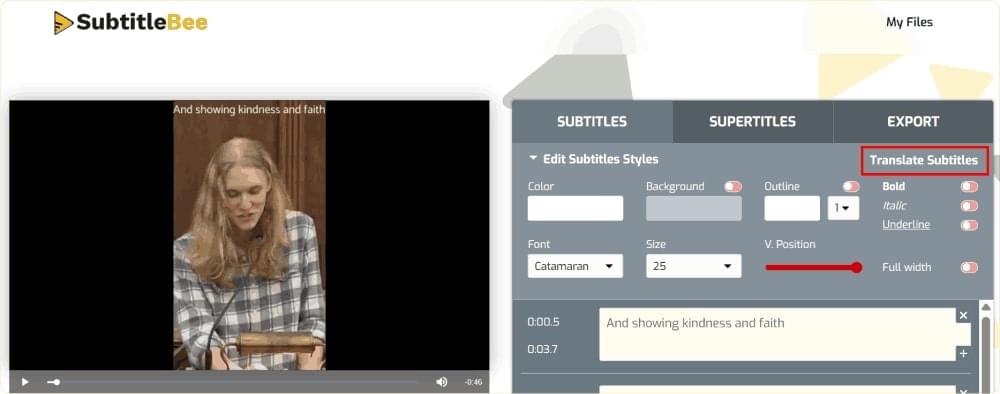
- Translate if you sell abroad (optional). Add another language to create a version for each market.
- Export the video with the subtitles burned in, in the size you need for each platform.
SubtitleBee is running its own Black Friday offer for new users this year, so it is a good time to try it on your sale videos.
Black Friday Video Mistakes to Avoid
- Hiding the offer. If the discount only appears in the last seconds, most viewers never see it.
- One long video for every platform. A two-minute landscape video does not work as a Reel. Cut short vertical versions.
- No deadline. “Sale now on” gives people no reason to act today. Always say when it ends.
- Unchecked auto captions. Automatic subtitles are a first draft. Brand names, prices and dates are the words most likely to be wrong.
- Starting on the day. If your first Black Friday video goes out on Friday morning, you have missed the people who planned their shopping that week.
Frequently Asked Questions
What Are Some Black Friday Marketing Ideas for Small Businesses?
Teaser videos before the sale, a clear offer-first ad, short product demos, a gift guide, customer reviews, behind-the-scenes clips and a last-chance reminder all work well for small businesses. They need little budget, and you can film most of them on a phone.
When Should I Start Posting Black Friday Videos?
Start one to two weeks before the sale with teasers and countdowns, then switch to offer and product videos when the sale starts. For Black Friday 2026, that means starting around November 13 for a sale that peaks on November 27.
How Long Should a Black Friday Video Be?
Keep most Black Friday videos short, around 10 to 30 seconds, and state the offer in the first two seconds. Product demos and how-to-claim videos can run a little longer if every second shows something useful.
Should Black Friday Videos Have Captions?
Yes. Many people watch social videos with the sound off, so captions and on-screen text make sure they still get the offer. Burned-in captions show on every platform, whatever the viewer’s settings.
How Do I Promote a Black Friday Sale on TikTok and Instagram?
Post vertical 9:16 videos with the offer on screen in the first seconds, add captions, and use the full calendar: teasers before the sale, demos and reviews during it, and a last-chance video at the end. Going live during the sale weekend and clipping the best moments gives you extra posts.
Plan Your Videos Before the Rush
Black Friday rewards the brands that are ready before the week starts. Pick three or four of these ideas, film them in vertical format, put the offer on screen and add captions so every viewer gets the message. Then try SubtitleBee to generate, translate and style the subtitles for all of them in one place.
Related Reads


Add and translate your subtitles to more than 100 languages with high accuracy
Our solution
SubtitleBee
Make your video understandable by using SubtitleBee for free
Start now for freeTop Articles

Getting Started with AI-Powered SubtitleBee

3 Effective Ways To Add Subtitles To Video Online Without Watermark
VEED vs. Kapwing: Which Subtitle Generator wins?
Kapwing vs. SubtitleBee: Which subtitling tool should you choose?

5 Top Verbit Alternatives for Transcription